
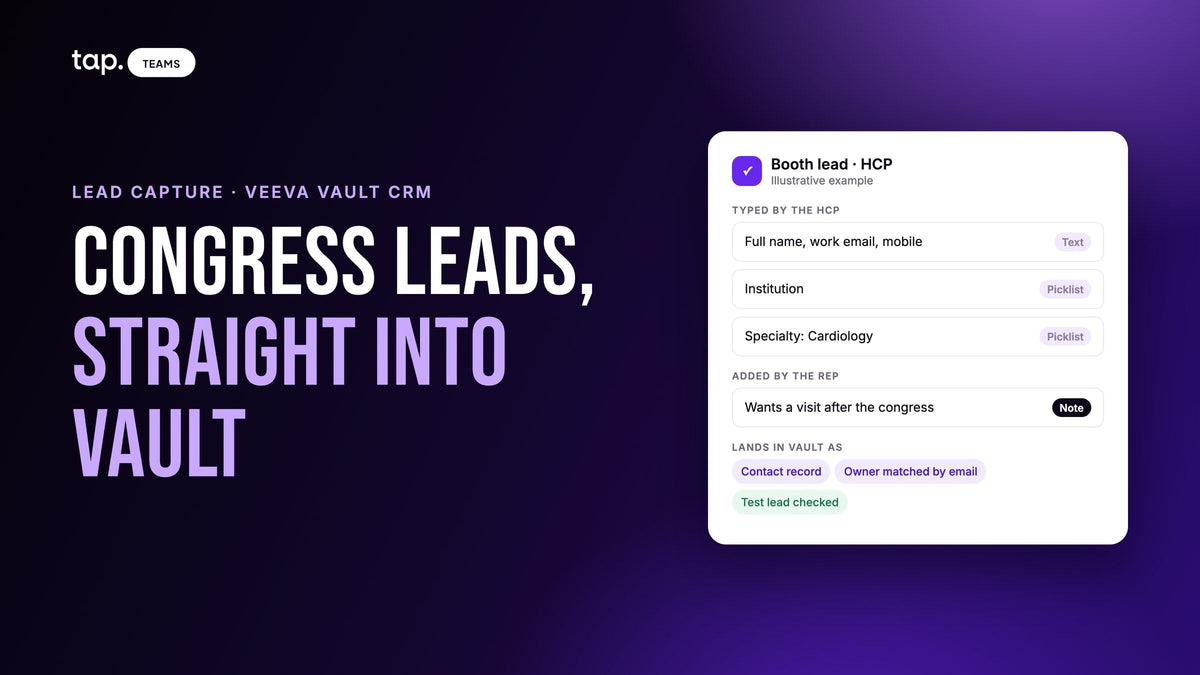
Veeva CRM lead capture means getting the healthcare professionals your team meets at congresses, hospital visits and symposia into Vault CRM as records someone will act on. Capture them on a short form or the organizer's badge scan, map every field to a Vault field that exists, confirm the record type and owner, and test one lead before the congress.
Most of what ranks for this search is vendor pages that say their app "syncs to Veeva" and stop there. The sync is the easy sentence. Whether it works depends on what you collect from an HCP, how your Vault is configured, where consent and notes fit, and whether the same cardiologist ends up as one record or two. That's what this guide covers. For the congress floor itself, meaning the organizer's badge scanner versus your own app, our guide to event lead retrieval has a section on medical congresses.
What lead capture means for a team on Vault CRM
Veeva describes Vault CRM as a CRM for life sciences that connects sales, marketing and medical teams on a single platform (veeva.com, checked October 17, 2026). For a field team, that usually makes it the system of record for every HCP interaction, and the first place compliance looks when someone asks what was said to whom.
Lead capture is the step before that record exists. Pharma reps don't talk about "leads" much, but the problem is familiar: a new contact at a congress booth, a hospital pharmacist met in a corridor, a department head who hands over a card after a symposium. Each is a person who isn't in Vault yet, or is in Vault under a different email, and the useful part of the conversation lives in the rep's head until someone writes it down.
Vault CRM has its own Events Management for events your company hosts, and Veeva's product brief describes QR self-sign-in and opt-in for attendees. Congresses you exhibit at work differently. The organizer runs registration and the badge scanner, and anything beyond the badge needs its own route into Vault.
Where pharma field leads come from
| Source | What you get | What usually goes wrong |
|---|---|---|
| Organizer badge scan at a congress | Registration details, often checked against professional credentials | Arrives as a spreadsheet after the congress, with nothing about what was discussed |
| Your own form at the booth | What the HCP typed, plus the rep's note | Answers that don't match Vault's picklist values get rejected |
| Hospital or clinic visit | Often a name and a mobile number | Typed in days later from memory, or never |
| Business card after a symposium | Name, title, institution, email | The card shows one hospital and the HCP works at two; reading errors |
| Referral from a colleague | A name and a reason to call | Sits in someone's inbox and never reaches Vault |
The badge scan is the most reliable identity record you'll get at a congress. It just doesn't carry the conversation. So most teams run two streams at a congress and a third the rest of the year in the field, and the work is making all three land in Vault the same way, on the same record type, owned by the right rep.
What to collect from a healthcare professional
Keep it short. Our pillar on lead capture form design covers why every extra field costs you finished forms. For HCPs, the useful fields differ from a general B2B form, because job title says very little when everyone in the aisle is a doctor. Specialty and institution decide who follows up and with what.
- Full name
- Email, ideally the work address the HCP already uses with your company, since that's usually what matching runs on
- Mobile
- Institution: the hospital, clinic or pharmacy
- Specialty
- A note at the end, for what they asked about
Anything you'd like to know but can look up later doesn't belong on a form an HCP fills in standing in an aisle. Before any of this goes live, ask compliance which fields you may collect at all and what consent wording sits on the form. That's a decision for your company, not your software.
Specialty and institution are also where Vault tends to push back. In many Vault configurations, specialty is a picklist and institution is an account the contact links to, not a line of free text. A typed "Cardio" won't match a picklist value of "Cardiology", and a typed hospital name won't attach to the account record. Ask your Vault admin how yours is set up. Then either offer a fixed list on the form that mirrors Vault's values letter for letter, or capture the answer as text into a field the admin has created for it and have someone reconcile after the congress. Our guide to CRM custom field mapping walks through the mapping method in general.
Set up the Vault side before the congress
Nearly every "the leads never arrived" story from a congress traces back to setup nobody tested. Give each of these checks a named owner and finish them a week before anyone travels.
The connecting account can write
Whatever pushes leads into Vault signs in with a Vault account, and that account needs permission to create and edit contact and activity records. A read-only account can connect without complaint and then fail on the first real record, which is a bad thing to discover on day one of a congress.
You know which record type you're writing to
If your Vault has several record types for contacts or activities, confirm which one congress leads land on. Records on the wrong type are easy to miss and tedious to move later, and they may not show up in the views your reps actually use.
Required fields and validation rules are covered
Vault instances are configured per company, and their rules are enforced when a record is written. A required field that nothing maps to fails every record. A mapping that works in another affiliate's Vault can be rejected by yours. Get the list of required fields from your admin and make sure the form collects each one.
Rep emails match Vault users
Owner assignment usually works by matching the rep's email in the capture tool to a Vault user's email. A rep who signs into one with a personal address and into Vault with a work address gets every lead assigned to the default owner. In a territory-based team, that often means nobody follows up.
One test lead, read field by field
Capture a test lead from a colleague's phone, open it in Vault and read every field: values, record type, owner. Then remove it the way your process says test data gets removed.

Consent, notes and recordings
This is where pharma differs most from an ordinary trade show, and I'd bring compliance in before choosing any tool. Nothing here is legal advice. The rules depend on your country, your company's procedures and the congress organizer's terms. The questions compliance asks tend to be the same, though:
- What may be recorded about an HCP interaction, and how long it's kept
- What the HCP agrees to on the form, and whether that covers follow-up emails
- Whether reps may record conversations at all, and how they ask for consent each time
- Whether free-text notes may go into Vault as written, or need review first
- Who sees the record: sales, medical, or both
Two habits help whatever the answers are. First, keep medical questions out of the sales note. If an HCP asks about an unapproved use, or mentions something that happened to a patient on your product, your company's process for medical information requests and safety reporting applies, and the lead form isn't that process. Second, know every place captured data ends up. When an HCP asks to be removed, deleting them in the capture tool doesn't delete them in Vault, and the spreadsheet someone exported after the congress counts too. Our guide to meeting intelligence for field sales covers recording consent in regulated industries in more detail.
Duplicates: one HCP, two records
Matching in most CRM syncs runs on email. Say an oncologist gives her hospital email at the congress booth, and three months later gives her personal email to a different rep during a clinic visit. Vault now has two contacts for one person, owned by two reps, with half the history on each. Neither rep knows the other has met her.

Three things keep this down. Make email required on the form. Ask for the address the HCP already uses with your company, in plain words: "the one our team usually emails you on." And give one person the job of running Vault's own merge tools after each congress, before the reps start calling. While you're at it, check how your sync treats a match: whether a blank form field can wipe a value already in Vault, and whether a typo can overwrite a correct one.
After the congress
The follow-up rules are the same as after any show: anyone you promised something to first, then the people who named a date. Our article on which trade show leads to call first has the full order and a timeline. Two things are specific to pharma teams. HCPs who are already in Vault belong to their territory rep, so route them there with a note on what they asked about instead of giving them to whoever stood at the booth. And tag the leads with the congress name afterward, in bulk, instead of asking HCPs to type it on the form.
Business cards collected at symposia and dinners need the same care as form leads. Scan them the same evening, check what the scan read, and confirm the institution matches the right account. Our piece on what a business card scan actually delivers to the CRM covers the gaps to check for.
How Tap handles this
Tap has a native Veeva Vault connector. A captured lead becomes a contact record in Vault, the meeting summary and action items become a call or activity record, and the rep who captured the lead becomes the record owner, matched by email. If no Vault user matches, the record lands with the default owner instead of failing. An admin connects it in Tap Teams under Integrations, then Veeva Vault, then Connect, signing in with a Vault account that can create and edit those records. The Veeva Vault docs list the same checks as above: your Vault's required fields, picklists and validation rules apply when Tap writes, so test against your own instance and confirm the record type before your first event.
At the booth or in a clinic, the HCP opens the rep's profile with an NFC tap, a QR code or a link and fills in the form on their own phone, with no app to install. An admin can put the capture fields on a template so every rep collects the same ones. Captures made offline appear once the phone reconnects, and a scanned business card becomes a lead that syncs the same way. Custom fields such as specialty or institution are mapped by hand to Vault fields that already exist (the field mapping docs explain how), and a field you haven't mapped stays on the lead in Tap and in exports. Free text pushed into a picklist is rejected, which is why the test lead matters. When a lead matches an existing contact by email, blank values don't erase what's in Vault, though a wrong value will replace it.
On the compliance side, Sync Notes is on by default for a new CRM connection, so switch it off when you connect if note text shouldn't leave Tap. CRM access is denied by default for each department, so a department you haven't granted Vault access can't sync anywhere. Recording consent stays your responsibility, and deleting a lead in Tap doesn't remove it from Vault. GDPR sensitivity mode is a company-wide setting for stricter handling of personal data; it supports your process without replacing it.
To see how this fits your Vault setup, look at Tap lead capture or book a 30-minute demo and bring your list of required Vault fields.
FAQ
Does Veeva Vault CRM have built-in lead capture?
Vault CRM includes Events Management for events your company hosts, and Veeva's brief describes QR self-sign-in and opt-in for attendees. At congresses you exhibit at, the organizer runs badge scanning, so teams usually combine the organizer's export with their own capture form or app that syncs into Vault.
How do I get congress leads into Veeva?
Either import the organizer's badge export after the congress, or capture on a form that syncs to Vault as you go. Either way, map every field to a Vault field that exists, match picklist values exactly, confirm the record type and owner, and test one lead before the congress opens. Tap's lead capture is one way to do the second.
What is congress lead retrieval?
It's the organizer's system for exhibitors to scan attendee badges and collect registration details. At medical congresses, organizers often set stricter rules on how exhibitors may use that data, so read the exhibitor manual first. Our lead retrieval guide compares it with running your own app.
Should congress contacts go into Vault as contacts or leads?
That depends on how your Vault is configured, so ask your admin which record type new HCPs should start on. Vault's data model treats the contact record as the entry point, which is why Tap's connector creates a contact record rather than a separate lead.

Leave a comment
This site is protected by hCaptcha and the hCaptcha Privacy Policy and Terms of Service apply.