
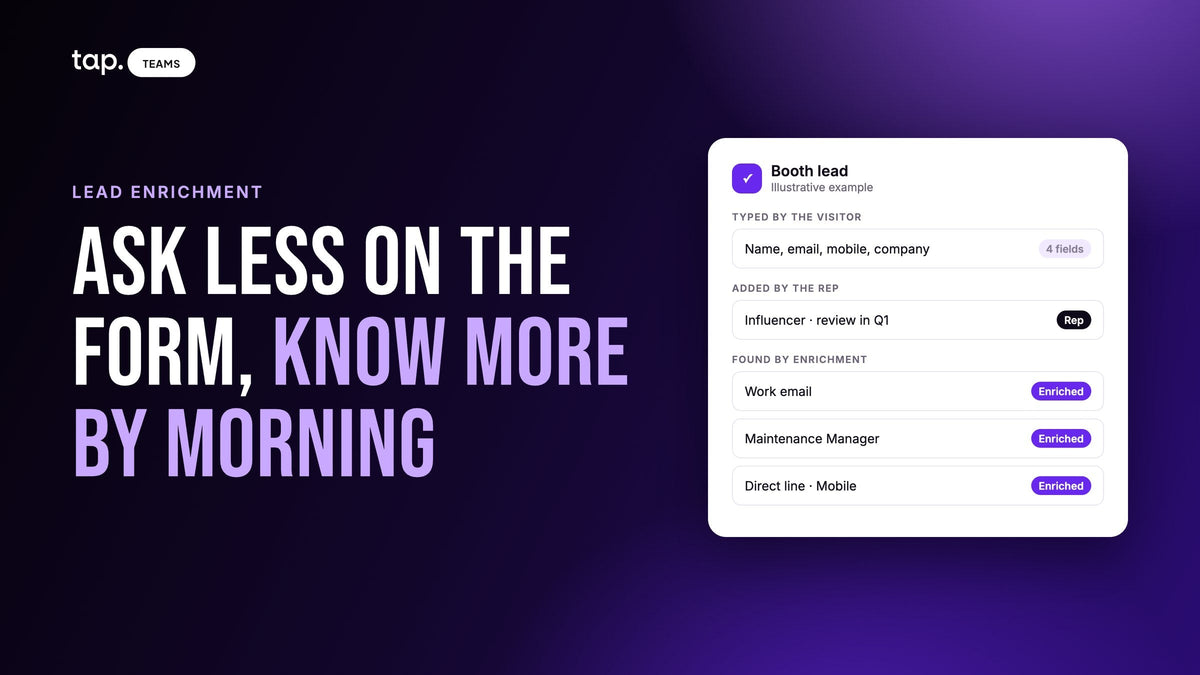
A lead form should ask only for what the person alone can give you and what enrichment needs to find them: name, email, phone, and a company or job title. Leave company size, industry, seniority and location to enrichment. Keep intent, timeline, need and buying role for the rep, because no database holds them.
Every field you add loses some people who would have finished, and every field you drop loses context. Enrichment lets you stop choosing for most fields, but only for the ones a database can know. This piece is about telling those apart, for forms filled in on a phone at a busy booth where you don't get a second visit.
Short form or long form: what you're really trading
The usual advice on form length is about volume against quality. Short forms bring in more leads, long forms bring in fewer leads with more detail, and you pick a point on the line. For website forms that's a fair way to put it, because a visitor can come back next week and answer two more questions.
In person the line looks different. Someone at a stand gives you one go at the form, standing up, while your rep keeps talking. Lose them at field seven and you don't get a thinner lead. You get nothing. So the question changes from "how much detail can we afford to ask for?" to "which details can we get some other way?" Our guide to lead capture form design covers how many fields to use and in what order. This one is about where the fields you cut end up coming from.
Sort every field into one of four piles
The test I use: who knows this fact best, and can you get it from them later? The person knows their own phone number better than any database. A database knows their company's headcount better than they'd bother to type it. And only the rep, who just heard them talk, knows whether they sounded like they were buying.
| Where it comes from | Fields | Why there |
|---|---|---|
| The form (the person types it) | Name, email, mobile, and company or job title | Only they know the number they actually answer, and these are what enrichment searches on |
| Enrichment (a lookup fills it) | Work email when they gave a personal one, direct phone, job title if blank, seniority, job function, company size, industry, headquarters, website | Public, professional facts that a database tracks better than a rushed visitor types them |
| The rep (asked or heard in conversation) | Buying role, the problem in their words, timeline, current supplier, who else decides, the agreed next step | No database holds them, and a stranger won't answer them honestly on a form |
| A tag (added afterward, in bulk) | Event name, campaign, territory | The same for every lead in the batch, so nobody should type it |

Keep the fields enrichment needs to find someone
Here's where short forms go wrong. Teams hear "enrichment fills in the rest" and cut the form down to a name and a mobile. Then half the lookups come back empty, because a first name and a phone number are very little to search on.
Enrichment works by matching. It takes what you captured and looks for one professional profile that fits. A full name with a company website or a corporate email is easy to match. "Ahmed" with a mobile number usually isn't. So the short form has a second job beyond being short: it has to keep at least one strong identifier besides the name.
- A corporate email does most of the work on its own, since the domain tells the lookup where they work.
- If people tend to give personal email addresses (and at events many do), keep the company name or company website on the form. That's the fallback the lookup needs.
- A job title helps the match and the score, which is why it's worth keeping when you can only keep one more field.
If your lookups keep coming back with "not enough details," you cut the wrong field. Put company back before you add anything else.
What enrichment can't know
Some vendor pages list intent among the things enrichment adds. For a web lead, that means signals like which topics a company has been reading about online. For someone your rep just spoke to, the most useful facts don't exist in any database, and they're the ones that decide who gets called first.
Intent and need
Why they stopped. What isn't working today, said in their own words. A lookup can tell you a hospital group has twelve sites; it can't tell you the pharmacy director is unhappy with her current supplier's delivery times. That sentence is what the follow-up call should open with.
Timeline
"We're reviewing this in Q1" or "the new plant opens in March." People with a deadline usually mention it unprompted. Nothing outside the conversation records it.
Buying role
Enrichment can find a title and a seniority level, and those are useful. But a director isn't always the decision maker on your product, and a manager sometimes is. Whether this person decides, influences, uses the product or controls access to the people who decide is something the rep works out by listening. Don't put it on a form a stranger fills in, either. They'll skip it or tick "decision maker."
The relationship and the rest of the deal
Whether they already buy from you or a competitor, who else is involved, and what the rep promised to send. These go missing first when a lead changes hands.
So the rep's part is short and fixed: in the minute after the person walks away, record the buying role and a line or two on need, timeline and next step. Fixed answers for the buying role are faster than typing, and a note covers the rest. Our lead enrichment guide explains what lookups do return; this list is what they don't.
Can enrichment fill a missing job title?
Usually, yes. Job title and seniority are standard outputs of a lookup. That doesn't make the title a field to cut first, though. It helps the match, and in a score like Tap's it counts twice, once for itself and once as the seniority fallback (more on that below). If you have to drop one, drop company when most people give a corporate email, since the domain already says where they work, and keep company when most give a personal one. Two caveats on titles filled by a lookup.
First, it needs a match. A blank title on a lead that also has no company and a personal email often stays blank. That's the match-key problem again.
Second, titles go stale. A business card can carry a title from two jobs ago, and a database can lag behind a promotion. When the lookup finds a title that differs from what the rep typed, treat it as a prompt to check, since it may mean the person has moved on. Don't let it overwrite the rep's version automatically.
The title matters for scoring too. In Tap's published score, a lead with no job title and no buying role loses 15 points for the title and up to 25 more for seniority, which is 40 points, the difference between Hot and Cold. Seniority found by enrichment can fill that seniority slot when nobody has set a buying role. A buying role the rep sets takes the slot first, which is right: the rep heard the conversation.
When should leads be enriched?
Before anyone calls them, and while the conversation is still fresh. For event leads that means one of two moments.
On capture, automatically, for leads above a minimum score. The record is complete by the time a manager opens the list, and nobody has to remember to start anything. Set the bar low enough that a lead missing its title isn't kept out for the very reason it needs enriching. Our piece on automatic lead enrichment covers the triggers and settings.
Or in one batch, the evening the show closes, after reps have filled in buying roles. That way a manager decides what's worth looking up with the rep's judgment already on each lead.
The wrong moment is two weeks later, as part of a CRM cleanup. By then the hot leads have heard from other suppliers, and you've paid to fill in records nobody is about to call. Enrichment is a snapshot of what the sources believed on the day you looked, so enrich close to when you'll act, and look again before reusing old records in a campaign.
A short form at a booth, start to finish
Say a rep at an industrial equipment show meets a visitor who asks about service contracts for three sites.
- The visitor fills in four fields on their own phone: name, email, mobile, company. They give a personal email, so company is the field that will make the lookup work.
- The rep, before the next visitor arrives, marks them as an influencer and writes "service contracts, 3 sites, review in Q1, ops director decides."
- That night the lead is enriched. The lookup finds a work email, a job title (Maintenance Manager), the company's size and industry, and a direct line.
- The next morning the rep calls the direct line and opens with the three sites. The ops director's name is the next thing to ask for.

A nine-field form wouldn't have produced that record. Nobody types "ops director decides" into a form at a stand.
Mistakes that make short forms backfire
Cutting the match keys. A name and a mobile alone is a short form that enrichment can't do much with. Keep company or a corporate email.
Cutting the phone. It's the field people are most tempted to drop, and for field teams it's often the one that gets the meeting. It's also the hardest to get back: a lookup doesn't always find a direct line, and when it does, it may not be the number they pick up.
Moving qualification onto the form. "Budget?", "Timeline?" and "Are you the decision maker?" are rep questions. On a form they get skipped or answered optimistically.
Letting enrichment overwrite the person. The mobile they typed is the one they answer. A lookup should fill empty fields only, and show a different value as a suggestion.
How Tap handles this
A new Tap account's capture form starts with four fields: full name, email, mobile and a note. Job title, company name, company website and LinkedIn are built-in fields you can add, and visitors who are Tap users see the form prefilled from their profile, with what they type winning. The event goes on afterward as a tag. The lead capture forms docs cover the setup.
Right after a lead is saved, the app asks two quick questions, Relationship and Buying role, which can be skipped and filled in later. The buying role takes the 25-point seniority slot in the lead quality score, and "Not relevant" caps the lead at 25.
Tap lead enrichment then fills in the work email, direct phone, job title, seniority and company details. It only fills empty fields and never overwrites what your team or the lead entered; when it finds something different, it offers it underneath with "Use this." A lead with too little to search on shows "Not enough details," so a rep can add a job title or the company website and retry. You pay only for what's found. An admin can enrich new leads automatically above a minimum score, enriched seniority feeds the score when no buying role is set, and enriched values are available in field mapping for your CRM. The enrichment docs have the detail.
See what enrichment adds to a short booth lead on the lead enrichment page, or book a 30-minute demo and try it on leads from your last event.
FAQ
How many fields should a lead form have?
As few as you can while keeping something enrichment can match on. For a form filled in on a phone at an event, that's usually name, email, mobile and company or job title. Website demo forms can carry a little more. Anything a database knows, like company size or industry, belongs to enrichment.
When should leads be enriched?
Before the first follow-up call. For event leads, either automatically as they're captured, above a minimum score, or in one batch the evening the event ends, after reps have recorded buying roles. Waiting weeks means paying for records nobody is about to call.
What's the best option for lead enrichment after an event?
Enrich only the leads someone will follow up, as soon as the rep's notes and buying roles are in. Check that the tool fills empty fields only, tells you when a lead was too thin to search, and charges only for what it finds. Then call while the conversation is still fresh.
Can enrichment fill missing job titles?
Usually, if the lead has a company or a corporate email to match on. Treat a found title as current but not certain. If it differs from what the rep wrote down, check before changing it, because the person may have moved roles.
What are some easy ways to get more info on my leads?
Keep the form short and let people type their own details. Have the rep record the buying role and one line on need and timeline right after the conversation. Tag the batch with the event. Then enrich the leads worth calling to fill in work email, phone, title and company details.


Leave a comment
This site is protected by hCaptcha and the hCaptcha Privacy Policy and Terms of Service apply.