
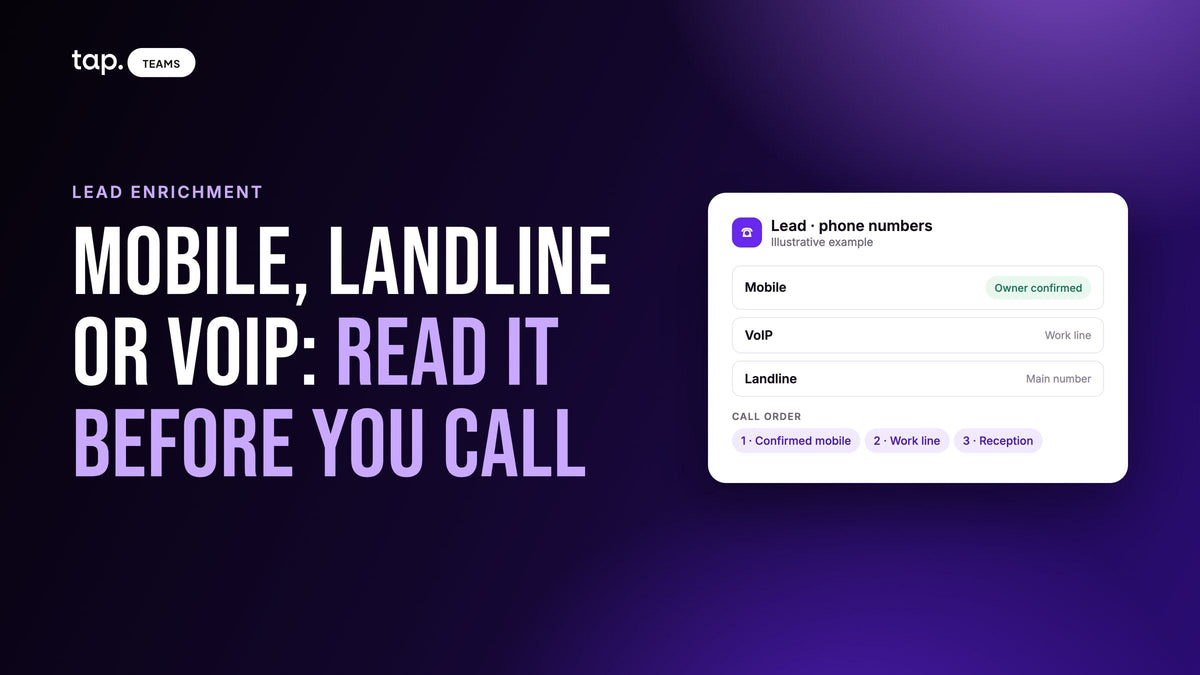
A phone number's type tells you what you're about to ring. A mobile usually reaches the person directly. A landline is a fixed line, often a desk phone or switchboard. A VoIP number runs over the internet and can ring a desk phone, laptop or app. The digits won't tell you which. A lookup will.
Most pages on this topic are written for developers cleaning SMS lists or fraud teams screening signups. This one is for the rep with a lead on screen and two or three numbers to choose from. Say you met a procurement manager at a trade show and only got her name and company. The next morning lead enrichment finds three numbers for her: a mobile, a landline and a VoIP line. Which do you dial, and what should you expect when you do?
Mobile vs landline vs VoIP: what each type means
Mobile
A mobile number belongs to a SIM or eSIM from a wireless carrier. It takes calls and texts, and it's usually in the owner's pocket. You're more likely to reach the actual person, but you're ringing a phone they also use for family, at a moment you didn't choose. A mobile number someone handed you at your stand comes with permission to call. One you found yourself doesn't, so use it with more care.
Landline
A landline is a fixed line tied to a physical address. In business, that usually means a desk phone, a reception desk or a main company number. Most landlines can't receive ordinary texts. A few carriers read a text out as a voice call, but you can't count on it. Expect a receptionist, a colleague or voicemail as often as the person you want. Still, a direct desk line can beat a mobile for a lead who keeps work and personal life apart.
VoIP
VoIP (voice over internet protocol) numbers carry calls over the internet instead of the traditional phone network. To the person dialing, they look like any other number, with normal local area codes. Many companies have moved their office phones to VoIP, so a "work number" is now often VoIP that rings a desk handset, a laptop app and a mobile app at once.
Lookup services sometimes split VoIP in two. A fixed VoIP number is tied to an account and an address, like a company phone system. A non-fixed VoIP number is one anyone can create in an app with an email login. That second kind is why fraud teams flag VoIP at signup. For a lead you met in person the worry mostly doesn't apply: you know who they are, and the only question is whether the number reaches them or a shared line.
You'll occasionally see a fourth type, toll-free. Those are company numbers for customers to call, almost never a person's own line.
| Mobile | Landline | VoIP | |
|---|---|---|---|
| Who usually answers | The owner | The person, a colleague or reception | Depends on how it's set up: the person, a team, or a forward |
| Can you text it? | Yes | Usually not | Sometimes |
| When it rings | Wherever they are | At their desk, office hours | Desk, laptop or phone app |
| Best use for sales | A first call the lead agreed to | Confirming the company, reaching someone through reception | A work line when you don't have a mobile |

How to tell if a number is a landline, mobile or VoIP
Looking at the digits won't do it. In many countries people can keep their number when they switch carriers, and VoIP numbers take ordinary local area codes, so a prefix that once meant "mobile" or "landline" no longer reliably does. There are a few ways to find out instead:
- Run a phone number type lookup. These tools check carrier records and return a line type, sometimes with the current carrier. Treat the answer as a good estimate, since numbers move between carriers and tools don't always agree.
- Check the source. An email signature that lists "M" and "T" or "Direct" and "Main" is telling you which is which. A number followed by an extension is a company line.
- Ask. At the stand, "Is this your mobile?" takes two seconds and answers it for good.
- Use enrichment that labels the numbers it returns, so the type arrives with the number instead of being a separate job.
At events, asking gets skipped more than it should. A number someone types into your form while standing in front of you is the most reliable one you'll ever have for them, and it comes with their permission to use it.
Which number to call first
When a lead has more than one number, the type gives you an order. Here's the one we'd use for a lead met in person:
- The number they gave you themselves, whatever its type. They expect the call.
- A mobile that's been verified as theirs.
- A direct work line, landline or VoIP, that's verified as theirs.
- Any other mobile. Check it's really theirs before you lean on it.
- The company's main number. Ask reception for the person by name and mention where you met.
Verified matters more than type. A mobile that used to be the lead's and now belongs to a stranger is worse than a switchboard. If your data says whether a number is confirmed as the person's own, use that first, and if it shows how often a number gets answered, let that break ties.
Speed changes the picture too. A lead from yesterday's show who gave you a mobile should hear from you while the conversation is still fresh. Our guide to trade show lead follow-up covers which leads to call first and when.

How the line type changes the follow-up
On a mobile, keep the first call short and say where you met in the first sentence. If they mentioned they'd rather message, a short text or chat message referencing the show is often better than a cold ring. Don't call early in the morning or late in the evening just because you can.
On a landline, plan for someone else to answer. Have the person's full name and job title ready, and a one-line reason that makes a receptionist want to put you through. Leave a voicemail with your number spoken slowly, twice. Don't text a landline and wait for a reply that probably can't come.
On a VoIP number, assume it may ring a team or forward somewhere. If a colleague answers, ask for the best way to reach the person directly. That question often gets you their mobile with permission attached, which is the best version of that number to have.
There's also a legal side. In the US, the FCC's rules require the person's consent before autodialed or prerecorded calls and texts to a mobile number, and written consent when those calls are telemarketing; the FCC guide to robocalls and texts explains the basics. Other countries have their own rules. This isn't legal advice: check with whoever handles compliance before mobile numbers go into an automated dialer or a texting campaign.
Keep every number, and keep the label
A lead with three numbers isn't a mess to clean up. People change jobs and carriers, and today's dead number might be next year's only working one. Keep all of them, in fields that say what they are. Most CRMs have separate mobile and work phone fields, and a mobile pasted into "Phone" loses the one fact that tells the next rep how to use it. If someone typed a number at the event, it should stay put when a lookup finds a different one. Show the new one beside it and let a person choose. Our article on checking enriched data on event leads walks through doing that field by field, and how to find a lead's work email and direct phone covers where those numbers come from in the first place.
How Tap handles this
Tap lead enrichment looks a lead up and fills in their work email, direct phone numbers, job title, seniority, job function and location, plus company details. Phone numbers carry what's known about them: Mobile, Landline or VoIP, Owner confirmed when the number is verified as theirs, and a pickup rate where one is available. So the rep can see which number is which, and which one is really theirs, before dialing.
Enrichment only fills empty fields. It never overwrites anything your team or the lead entered. When what it finds differs from what someone typed, Tap shows the found value underneath with a "Use this" option, and one click accepts it. The number the lead gave you at the stand stays where it is.
You choose what to look up: "Work email" brings the work email and company details, and "Work email and phone" adds a direct phone number. The cost is shown before you confirm, and you're charged only for what's found. To add a phone number to one lead later, open it and choose "Enrich phone"; if no number turns up, no credits are used. Enriched values are available in CRM field mapping, so they can reach the CRM fields you pick. The lead enrichment docs cover the rest.
To see what your last event's leads would look like with their numbers labeled, take a look at lead enrichment or book a free 30-minute demo.
FAQ
What is a VoIP number?
A VoIP number is a phone number that carries calls over the internet instead of the traditional phone network. It looks like any other number and can ring a desk phone, a computer or a phone app. Many company phone systems now run on VoIP, so a work number is often a VoIP number.
How can you tell if a number is a landline?
Not from the digits, since number porting and VoIP have made prefixes unreliable. Use a phone number type lookup, check whether the person's signature labels it as a main or desk line, or ask them. Most landlines can't take a text, which is one practical reason to know.
Is a VoIP number a bad sign for a sales lead?
Usually not. Fraud teams flag app-based VoIP numbers at online signup, but a lead you met in person with a VoIP work line most likely just works somewhere with an internet phone system. The real question is whether the number reaches them directly or rings a shared line.
Can you text a landline number?
Usually not. Most landlines can't receive text messages, and you often won't be told it failed. A few carriers convert a text to a spoken voice message, but don't plan around that. Mobiles can receive texts, and some VoIP numbers can too.
Should sales reps call mobile or landline numbers first?
Call the number the lead gave you first, then a mobile verified as theirs, then a direct work line, then the main company number. Before putting mobile numbers into an automated dialer or texting tool, check the consent rules where you operate.

Leave a comment
This site is protected by hCaptcha and the hCaptcha Privacy Policy and Terms of Service apply.