
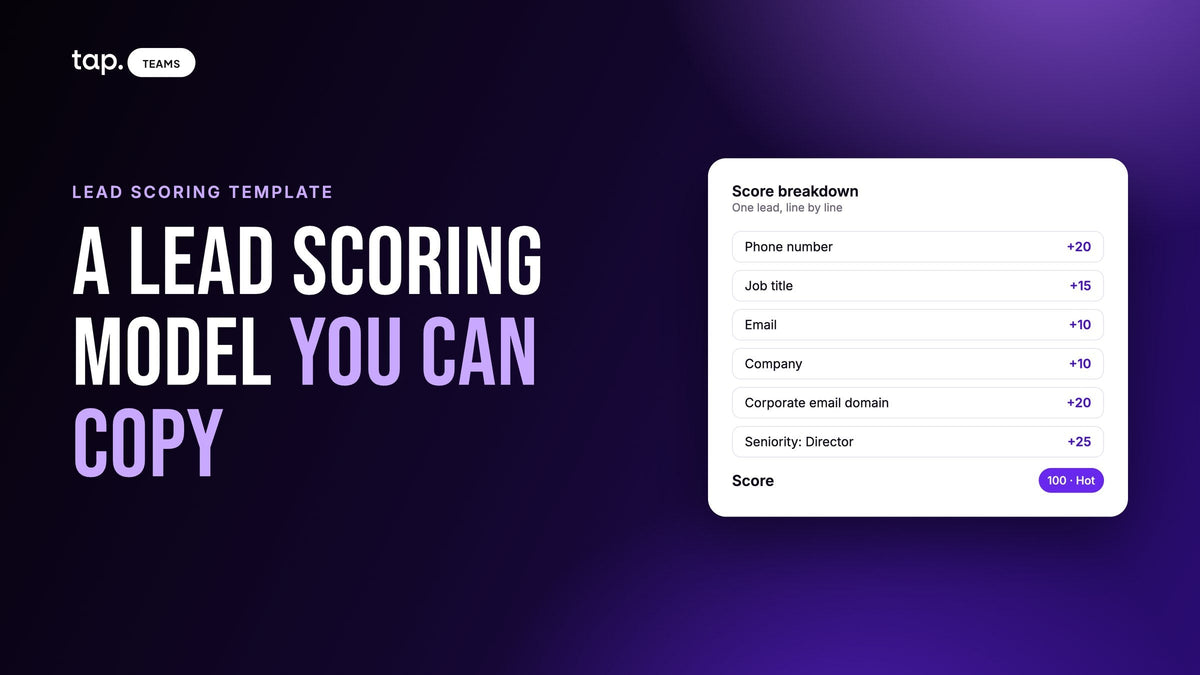
Here's a lead scoring model example you can copy. A lead earns 55 points for phone, job title, email and company, plus 5 for any other field filled in. A corporate email domain adds 20, and seniority adds up to 25. Cap the total at 100. Hot is 75 to 100, Warm is 40 to 74, Cold is below 40.
Below are the weights and the reasons for them, three made-up leads scored line by line, a spreadsheet version, and a way to check the model against deals you've already closed. It's built for leads your team meets in person, at a trade show or on a field visit, where there's no click history and all you have is what the rep wrote down. For the broader case for scoring, see our practical guide to lead scoring for event and field leads.
The model: every criterion and its points
| Criterion | Points |
|---|---|
| Phone number, mobile or work | +20, counted once |
| Job title | +15 |
| +10 | |
| Company | +10 |
| Any other filled field (name, office phone, fax, a custom question) | +5 each |
| Location: city, country, street and postal code together | +5, counted once |
| Email on a corporate domain | +20 |
| Email on a free domain (gmail, outlook and similar) | 0 |
| Seniority slot (see below) | up to +25 |
A mobile and a work number together still earn 20. You're scoring whether you can call the person, and two numbers don't make them twice as callable. Location only counts once too, so a lead with a full street address can't outscore one with a job title. Links and uploaded files get nothing.
One seniority slot, three possible sources
Seniority is worth up to 25 points, and it's filled from the first of three sources that has an answer. First the buying role your rep set, then the seniority found by lead enrichment, then the job title. They never add up.
| Points | 1. Buying role (set by the rep) | 2. Enrichment seniority | 3. Job title |
|---|---|---|---|
| +25 | Decision maker | Owner, Founder, C-level, Partner, VP or Director | C-suite, VP or Director |
| +15 | Influencer | Head or Manager | Manager or Head |
| +8 | End user | none | none |
| +5 | Gatekeeper | Senior | Specialist |
| 0 | Not relevant, and the whole score is capped at 25 | none | none |
The order matters more than the numbers. The buying role is a call made by the person who stood there and talked to them, so it wins. Enrichment checks the person's current role against outside data, which I'd trust over a title typed on a phone at a crowded booth. The title is the fallback. If the title doesn't match any level (say, "Coordinator"), it still earns its 15 field points and the slot stays empty.

Thresholds: Hot, Warm and Cold
- Hot, 75 to 100. Call them the same day.
- Warm, 40 to 74. They go into a follow-up sequence.
- Cold, 0 to 39. Nurture them or leave them alone. You don't know enough to put them ahead of anyone else.
It helps to know what it takes to cross each line. Phone, job title, email and company alone come to 55. Add a company email and you're at 75, Hot, before the title's seniority is even counted. On a gmail address a Director still gets there: 55 plus 25 for the title is 80. A name, a phone number and a gmail address get you 35, which is Cold.

Three leads scored line by line
The people are invented. The arithmetic follows the rules above exactly.
Example 1: a director with a company email and full details
Layla hands over a business card with everything on it. Nobody sets a buying role and she hasn't been enriched.
- Name: +5 (any other filled field)
- Mobile number: +20
- Job title, "Director of Procurement": +15
- Email: +10
- Company: +10
- Email on her company's domain: +20
- Seniority slot, from the title (Director): +25
That's 105, which the cap brings down to 100, Hot. An office number on the card wouldn't change anything. She's already at the ceiling.
Example 2: a manager with a gmail address and no phone
Karim gives his name, a personal gmail address, his company and his title, then walks off before the rep gets a number.
- Name: +5
- Phone: not captured, 0
- Job title, "Regional Sales Manager": +15
- Email: +10
- Company: +10
- Free email domain: 0
- Seniority slot, from the title (Manager): +15
Total: 55, Warm. A phone number alone would add 20 and make him Hot at 75. A work email instead of gmail would add another 20, and with both he'd be at 95. Two missing details cost him 40 points.
Example 3: a decision maker flagged by the rep
Sara owns a mid-sized distributor. The booth is packed, so the rep gets her name, a mobile number and a gmail address and nothing else. In the conversation she mentioned she signs off on supplier decisions herself.
- Name: +5
- Mobile number: +20
- Email: +10
- Free email domain: 0
- Job title and company: not captured, 0
- Seniority slot: no buying role, no enrichment, no title, 0
Total: 35, Cold. Then the rep sets her buying role to Decision maker. The slot now holds 25 and she moves to 60, Warm. If enrichment later reports her as an Owner, nothing changes, because the buying role already has the slot.

The cap works in the other direction too. If the rep had marked Layla from Example 1 as Not relevant, her 100 would drop to 25, and she'd be Cold no matter what's on the card. That's the model's only negative score, and I think one is enough: it comes from a person's judgment, so reps trust it.
Why the weights look like this
Phone gets the most because the fastest follow-up in field sales is a call, and a form without it starts every lead 20 points down. Job title is worth more than it looks: 15 as a field, plus the 25-point slot when there's no buying role or enrichment result. Losing it can cost the whole gap between Hot and Cold.
The gmail penalty is the weak spot. A director on a personal address misses the 20-point bonus because the model can't tell a senior buyer on gmail from anyone else on gmail, and it's the most common reason a lead you know is excellent shows up as Warm. Lead enrichment can find their work email for the follow-up, and its seniority feeds the slot when the rep hasn't set a buying role.
There are no behavior points, either. Email opens and page visits don't exist for someone you met at a stand, so the conversation has to stand in, and the buying role is how a rep turns it into points. Someone who asked for a demo next week still scores the same as someone who drifted past unless the rep records it. Read the score next to the meeting notes and summary.
How to build your own lead scoring model, step by step
If your market is different, build your own the same way. This is the order I'd go in.
- List what your reps actually capture. A criterion nobody can fill in at the booth is decoration. Our guide to lead capture form design covers keeping the form short enough that people finish it.
- Rank the fields by how much they change the rep's next move. A phone number changes the follow-up completely and a fax number doesn't. Weight the top few and give the rest a flat 5.
- Pick a fit signal you can capture reliably. Here it's a corporate email domain.
- Give overlapping signals one slot with a fixed order. Buying role, enriched seniority and job title all describe the same thing. Let them stack and a director with an enrichment result outscores an identical director without one.
- Add a cap and at most one override, like the 100 ceiling and the Not relevant cap here.
- Set the tier thresholds from call capacity (see below).
- Before anyone uses it, score past leads and compare with what actually happened.
A spreadsheet template you can copy
One row per lead, in Google Sheets or Excel. Columns B to H hold points; I to K hold the three seniority sources as text.
- A: lead name
- B: phone, 20 if any phone number was captured, otherwise 0
- C: job title, 15 or 0
- D: email, 10 or 0
- E: company, 10 or 0
- F: other fields, 5 times the number of other filled fields (name included)
- G: location, 5 if city, country, street and postal code are all there
- H: domain, 20 for a corporate email, 0 for a free one
- I: buying role, as text, blank if nobody set it
- J: enrichment seniority, as text, blank if there's no result
- K: title level (C-suite, VP, Director, Manager, Head or Specialist), blank if none fits
On a second tab, make three small lookup ranges from the seniority table and name them Roles, Enrich and Titles. Then column L, the slot:
=IF(I2<>"", VLOOKUP(I2, Roles, 2, FALSE), IF(J2<>"", VLOOKUP(J2, Enrich, 2, FALSE), IFERROR(VLOOKUP(K2, Titles, 2, FALSE), 0)))
Column M, the score, with both caps:
=IF(I2="Not relevant", MIN(25, SUM(B2:H2)+L2), MIN(100, SUM(B2:H2)+L2))
Column N, the tier:
=IF(M2>=75, "Hot", IF(M2>=40, "Warm", "Cold"))
To test it, type in Karim from Example 2. B is 0, C 15, D 10, E 10, F 5, G 0, H 0, I and J blank, K "Manager". L should come out at 15, M at 55 and N at Warm. If it doesn't, the lookup ranges are usually the problem.
How to set the thresholds
This model uses 75 and 40. If you're building your own, treat a threshold as a promise about workload. "Hot means a call today" only holds if the team can make that many calls today, so work backwards from capacity.
Say four reps can each make 15 proper calls the day after a show. That's 60 calls. Score the lead list from your last event, sort it high to low, and look at the score of the 60th lead. That's roughly where your Hot line wants to be. Do the same for Warm: find the point below which nobody will realistically touch a lead in the next couple of weeks.
Once the lines are set, leave them alone. If Hot means 75 this quarter and 68 the next, reps stop trusting the labels and go back to sorting by gut.
How to check the model against closed deals
Nobody gets the weights right on paper, and I wouldn't roll a model out before back-testing it. Take the leads from your last event or two that now have an outcome, whether won, lost or dead. Score each one using only what was captured at the event, and ignore anything you've learned about them since. Then count how the outcomes fall across Hot, Warm and Cold.
You want the wins bunched in Hot and Cold mostly quiet. When wins keep turning up in Cold, open those records and see what they share. If it's a missing field, like no phone number, fix the form and leave the weights. If it's senior people on personal email, that's the gmail gap, and the fix is getting reps to set the buying role.
When you change a weight, change one at a time, rescore the same list and ask which version you'd rather call from. A few rules I'd keep:
- New fields come in at 5 points. Raise one only once the leads who answer it clearly close more often.
- A new seniority source gets a place in the order. It never stacks on top of the others.
- "Seemed keen" isn't a field. Turn it into a question with fixed answers, the way the buying role works, or leave it in the notes.
- Any rep should be able to work out a lead's score in their head. If they can't, the model is too clever.
Rerun the check after each big event, or once a quarter if events are small and frequent.
How Tap handles this
This is the model Tap uses, weight for weight. In Tap Teams it shows as a percentage with a colored bar, so a manager can sort a long list and work down from the top. In the mobile app the same score is a Hot, Warm or Cold badge, for triage at a busy stand.
Right after a lead is saved, the app asks two quick questions, relationship and buying role. Both can be skipped and answered later. Relationship is only for sorting. The buying role takes over the seniority slot, exactly as in Example 3. The full rules are in the lead quality score docs, and the enrichment docs show how to enrich automatically only the leads above a minimum score.
If you'd like your own event leads sorted this way, book a 30-minute demo or see Tap for sales teams.
FAQ
What is an example of a lead scoring model?
The one above: phone 20, job title 15, email 10, company 10, other fields 5 each, a corporate domain 20 and a seniority slot worth up to 25, capped at 100. Hot starts at 75, Warm at 40.
What's the difference between a lead scoring model and a lead scoring matrix?
People use the terms loosely. A matrix is usually the grid itself, criteria down one side and points across, like the two tables in this article. The model is the matrix plus the rules around it: which sources win when they overlap, the caps, and the thresholds that turn a number into an action.
What is a good lead score?
It depends on the model. In this one, 75 or more out of 100 is Hot and worth a same-day call. In your own, set the line by how many leads the team can call the next day.
What criteria should a B2B lead scoring model use?
For leads met in person: phone, email, job title, company, a corporate email domain and seniority. Make seniority one slot, filled first from the rep's read of the person's buying role.
What is negative lead scoring?
Taking points away for signals that a lead won't buy. Online models subtract for things like unsubscribes. This model has a single override instead: a buying role of Not relevant caps the score at 25, so the rep's judgment beats a full business card.


Leave a comment
This site is protected by hCaptcha and the hCaptcha Privacy Policy and Terms of Service apply.