
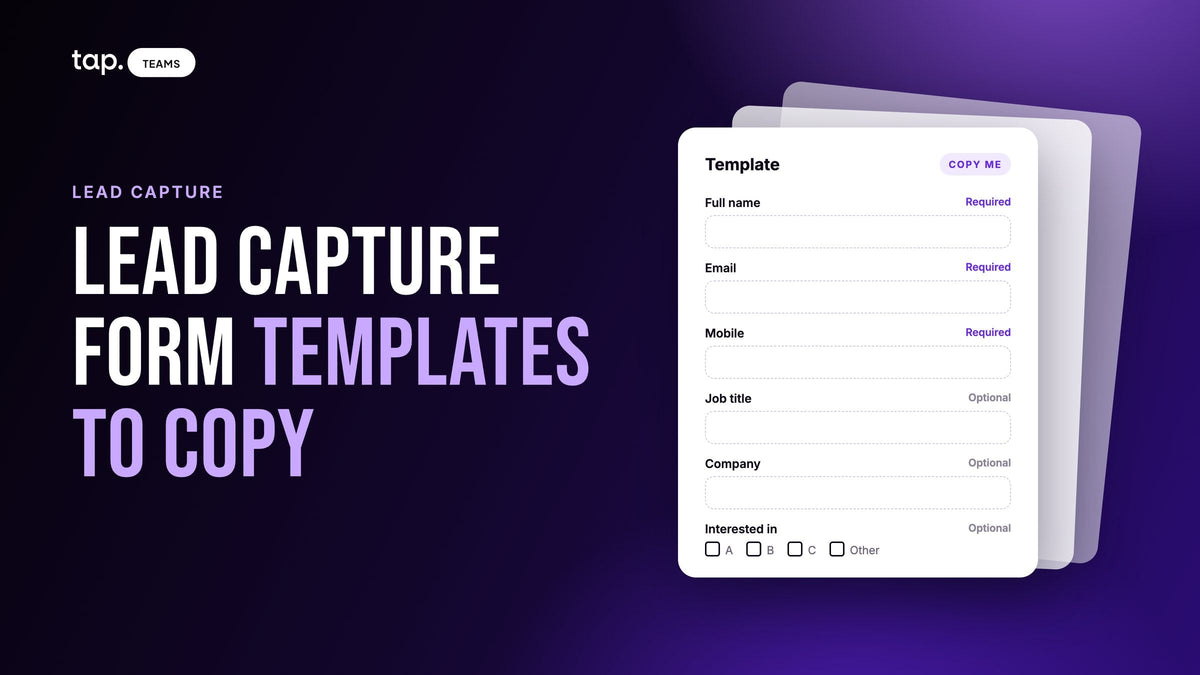
Here's a lead capture form template you can copy: full name, email and mobile, all required, then job title, company and one question about what they want from you, all optional. That's six fields, three of them required. Below it are versions for a trade show booth, a conference without a booth, a field sales visit and a paper or tablet lead card.
Each template lists the field type, whether it's required, and why it's there. If you want the reasoning behind the design, like field order, labels and keys, and testing on the day, our guide to lead capture form design covers it. This page is the forms themselves.
The basic lead capture form template
Start here if you don't know yet where the form will be used. It works on a phone and fits on a card.
| Field | Type | Required? | Why it's there |
|---|---|---|---|
| Full name | Text | Required | You can't follow up with someone you can't address |
| Required | The default follow-up channel, and the field most CRMs use to spot duplicates | ||
| Mobile | Phone | Required | The fastest way to reach a lead who's worth a call, and the hardest detail to find later |
| Job title | Text | Optional | Tells your team at a glance how senior the person is |
| Company | Text | Optional | Groups leads by account; often guessable from a work email if it's skipped |
| What can we send you? | Dropdown | Optional | Turns the conversation into a next step and routes the lead |
The dropdown is the one field to rewrite for your business. I'd give it three or four fixed answers, such as "Product brochure", "Price quote" and "Book a meeting", plus "Something else". Fixed answers sort cleanly in a spreadsheet or a CRM. Free text gets you twenty spellings of the same request.
Six fields is the most I'd put in front of a stranger. Only three are required, though, so someone in a hurry is done after three. If you want a note field, add it last, where skipping it costs nothing. If you're tempted to add more, read our piece on lead form length first. Most of what teams want to add, like company size or industry, can be filled in later from a work email.
How to decide what's required
The test I use is one question: could your team follow up without this field? If the answer is no, make it required. If yes, leave it optional, however useful it is.
Name, email and phone pass. Job title and company help qualify a lead, but you can follow up without them, so they stay optional. A form that forces six answers loses the person who'd happily have given you three.
There's one exception. Some CRMs refuse a record that's missing a field they need, and a lead your CRM rejects is worse than a lead with a blank title. Check what your CRM requires before you finalize the form, and make those fields required too.

Trade show lead form template: the booth visitor's own phone
At a booth, the visitor fills the form in on their own phone while your rep keeps talking. They're standing, distracted and probably on a crowded network, so the form stays short and asks only what they know for sure.
- Full name: text, required
- Email: email, required
- Mobile: phone, required
- Job title: text, optional
- Company: text, optional
- What can we send you? Dropdown with your product lines or offers, optional
There's no note field here on purpose. The visitor won't write one at a booth, and your rep knows more about the conversation than the visitor would type anyway. Have the rep add notes on their side after the visitor leaves.
Don't add a "Which event are you at?" field either. Tag the whole batch with the event name afterward, using a tag your team agreed before the show.

If the show also rents badge scanners, the form and the scanner do different jobs. Our guide to event lead retrieval explains when the organizer's scanner is still worth having.
Event lead capture form template: a conference without a booth
Without a booth, conversations happen in corridors and coffee lines. Nobody fills in six fields on the way to a talk, so ask for the minimum and let the rep do the rest that evening.
- Full name: text, required
- Email: email, required
- Mobile: phone, optional
- Company: text, optional
That's it. Phone drops to optional here because the person is about to walk off, and a required field is the one that makes them give up. If your team scores leads on phone numbers, accept the trade. A name and an email you actually got beat a full record you didn't.
The rep adds what they heard (role, interest, any promise made) in their own notes before the end of the day. By the next morning, five corridor conversations have blurred into one.
Field sales visit template: the rep fills it in
On a visit to a customer's office, clinic or site, your rep fills the form in, usually in the car straight afterward. The rep isn't a stranger being asked for effort, so this template can run longer, and some of its required fields are ones a visitor would never see.
- Full name: text, required
- Company or site: text, required
- Mobile: phone, required
- Email: email, optional (ask, but don't stall the visit for it)
- Job title: text, optional
- Role in the decision: dropdown with Decides, Influences, Uses it, Not involved; required
- Next step: dropdown with Send information, Second visit, Quote, Nothing agreed; required
- Next step date: date, optional
- Note: long text, optional
Role and next step are required because they're the reason the visit happened, and they're exactly what the rep forgets by Friday. Keep them as dropdowns so two reps describe the same situation the same way.
Lead card template for paper or a tablet
A lead card is the fallback: a printed card, or one shared tablet at a stand, for when the venue has no signal or the team still likes paper. Keep it to what fits on an index card or half a sheet.
- Name, company and job title: one line each
- Email: a line with "write in capitals" printed under it
- Phone: one line
- Interested in: three or four tick boxes with your product lines
- Next step: tick boxes for Call, Send information, Visit
- Priority: tick boxes for Today, This week, Later
- Rep initials and date: filled in by the rep
Print the event name on the card once rather than leaving a line for it. Tick boxes beat lines everywhere you can use them, because a tick can't be misread the way handwriting can. Even so, expect a few emails you can't make out.

The real cost of a paper card shows up later, when someone has to type a stack of them in, guess at the handwriting and chase the leads that went cold in the meantime. If that's the part your team dreads, book a free 30-minute demo and we'll show you capture on the visitor's own phone instead.
Which fields go on which template
Here are the five templates side by side. A dash means the field isn't on that version.
| Field | Basic | Booth | Conference | Field visit | Lead card |
|---|---|---|---|---|---|
| Full name | Required | Required | Required | Required | Yes |
| Required | Required | Required | Optional | Yes | |
| Mobile | Required | Required | Optional | Required | Yes |
| Job title | Optional | Optional | - | Optional | Yes |
| Company | Optional | Optional | Optional | Required | Yes |
| Interest or offer | Optional | Optional | - | - | Tick boxes |
| Role in the decision | - | - | - | Required | - |
| Next step | - | - | - | Required | Tick boxes |
| Note | - | - | - | Optional | - |
The pattern is simple. The less time the person has, the fewer fields are required, and anything only your rep can judge goes on the rep's side rather than the visitor's.
How to adapt a template to your team
Change the custom question first. "What can we send you?" is a placeholder for whatever routes a lead in your business: product line, region, clinic, project. One custom question is usually enough. If you can't decide between two, ask which one changes who calls the lead back.
Use standard fields wherever one fits. Email, phone, job title and company map to standard CRM properties. A custom field such as "Work email" does the same job but needs its own mapping in every CRM you connect.
Translate the labels if your visitors read Arabic or French, but keep the field's underlying name the same. Your CRM mapping points at that name, not at the words people read.
Add one plain sentence saying what you'll do with their details and a link to your privacy policy. If your industry has specific consent rules, get the wording approved before the event.
What to do after capture
Before and after each event:
- Fill in the form yourself, then open the lead in your CRM and read every field. Custom questions are the ones that go missing.
- Tag the whole batch with the event name in one go, using the tag everyone agreed beforehand.
- Type up paper or tablet cards the same evening, while the rep can still remember whose handwriting says what.
- Call back the people you promised something first, then work down by priority. Our piece on which trade show leads to call first sets out the order.
- After the event, look for fields that came back empty on most leads. Either visitors skip them or they aren't syncing. Fix the second, and drop the first.
If you'd rather not rebuild the form for every event, our lead capture page shows how one team form works in Tap.
How Tap handles this
In Tap, the lead capture form is what a visitor sees after tapping a rep's NFC card, scanning their QR code or opening their profile link. It opens in the visitor's browser with nothing to install, and the lead is created as soon as they submit.
Admins build the form in Tap Teams under Settings, Lead capture, and can adjust it for each member from the member editor. A template can carry its own capture fields, and those override each rep's personal form, so the whole team asks the same questions. In the mobile app, each profile has lead capture switched on or off.
A new account starts with four fields: full name, email, mobile and a note. Built-in fields cover name, email, job title, LinkedIn, company name and website, several phone types, location and notes, with types including text, email, phone, URL and long text. Built-in fields map to your CRM's standard properties automatically, while custom questions, like a product-interest dropdown, are mapped by hand. If you sync to Salesforce, the docs suggest making company required, because Salesforce's standard Lead needs one. Visitors who are Tap users see the form prefilled from their profile, and anything they type wins.
When someone won't use the form, reps can scan a business card, QR code or event badge and review what was read before saving, or add the lead by hand. The docs cover lead capture forms, scanning and field mapping. See how it works for a team on the Tap lead capture page.
FAQ
What should a lead capture form template include?
Full name, email and phone as required fields, then job title, company and one question about what the lead wants, all optional, with a note field last. For a booth or a conference, cut it down further. For a rep filling it in after a visit, add role in the decision and the next step.
Is there a free trade show lead form template I can copy?
Yes, the booth template above: full name, email and mobile required, then job title, company and a "What can we send you?" dropdown, all optional. Copy the fields into whatever form tool you use. No download or sign-up is needed.
What is a lead card?
A lead card is a short printed or tablet form a rep or visitor fills in at an event, usually when phones aren't practical. A good one fits on half a sheet, uses tick boxes for interest, next step and priority, and asks for email in capitals so it can be read later.
What's the difference between a lead capture form and a data capture form?
A data capture form is the broader term for any form that collects information, from registrations to feedback. A lead capture form is the kind built for sales follow-up, so it asks for contact details first and keeps everything else short.
How many fields should a lead capture form template have?
Four to six for a form a stranger fills in at an event, with no more than three required. A form your own rep fills in after a visit can run longer, because the rep isn't the one who might give up.

Leave a comment
This site is protected by hCaptcha and the hCaptcha Privacy Policy and Terms of Service apply.