
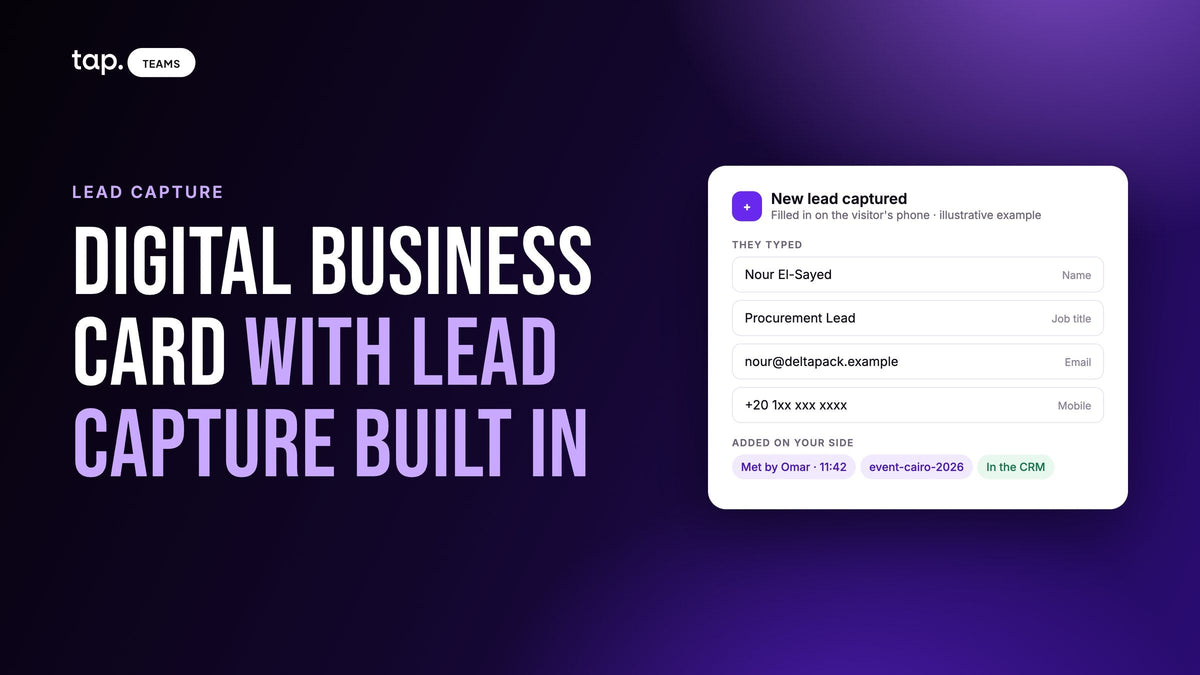
A digital business card with lead capture built in does two jobs in one share. It shows the other person your details, and it collects theirs: a short form opens on their phone, they submit it, and a lead record is created on your side with the time, the rep who met them and room for a note, usually synced straight to your CRM.
A plain digital card does only the first job. That difference is the whole article: what "built in" means, whether the card app you already have is enough, and when you still need the organizer's badge scanner.
What "lead capture built in" means
Every digital business card shares your details. Someone taps the card or scans a QR code, your profile opens in their browser, and they can save your number. If that's all it does, you've handed over a very good paper card. You know you were seen. You don't know by whom.
Lead capture built in turns the exchange around. The same share opens a form the visitor fills in on their own phone, and the moment they submit, a record exists on your side. Not a saved contact in their phone; a lead in your system, carrying:
- the details they typed, usually name, email, phone, job title and company
- when it happened and which rep on your team met them
- which event or visit it came from, normally a tag the team applies afterward
- whatever the rep adds while it's fresh: a note, a buying role, an answer to one qualifying question
- a copy in your CRM, owned by that rep
Most of these apps also let the rep capture from their side when the visitor won't pick up their phone: scan a paper card or a badge, or type in a name and a number. That's the fallback. The default is the visitor typing their own details, since people rarely misspell their own email.
What a card alone leaves you with
Say a rep shares a plain digital card thirty times during a show day. The dashboard reports thirty views. The CRM reports nothing. Some of the thirty saved the contact, some meant to, and the rep remembers five of them by face. Follow-up now depends on the visitor deciding to write first, which is the one step a sales team can't schedule.
Field visits go the same way. A rep taps a card on a pharmacist's phone, the pharmacist saves it, and six weeks later nobody can say which pharmacies were visited that week. Views and taps are activity. They aren't pipeline.
The admin side, templates, departments and who keeps the contacts when a rep leaves, is in our guide to digital business cards for teams. This one stays on capture.

What a built-in capture flow should collect and do
Start with the form on the visitor's phone. It opens in the browser with nothing to install, and it's short: four to six fields, contact details first, any free-text box last. Our lead capture form design guide works through which fields earn a place; the short version is name, email, phone, job title and company, plus at most one question that changes what your team does next.
Then a scanner for everyone who won't fill it in: paper cards, event badges, somebody else's QR code. It has to show the rep what it read before saving, because one misread character in an email is a lead you can never contact. What a scan does and doesn't send is in business card scanner to CRM.
Offline matters more than it sounds. Exhibition halls lose signal at the exact moment everyone is trying to exchange details, so captures made offline should queue and sync when the phone reconnects, and ideally the card itself can be shared with no connection.
Each lead needs an owner and a CRM record, and both should exist inside the conversation rather than after an export: the lead is attached to the rep who met the person and lands in the CRM under that rep. Record types, field mapping and owner matching are covered in digital business cards with CRM integration, so I won't repeat them.
After the visitor submits, the rep adds the things only they know: what role this person plays in a purchase, one line on what was said. Thirty seconds at the stand beats an hour of guessing a fortnight later. Some teams record the conversation instead, with the other person's consent, and let the summary carry it.
A score or a tier then sorts the follow-up list before anyone opens it. A team coming back from a three-day show with a few hundred leads can't read them all on the flight home. A mechanical score built from what was captured (phone, job title, corporate email, buying role) puts the likely calls at the top, and the rep's note tells you what to say.
Last, tags for the event, applied in bulk afterward with a name agreed before anyone travels, instead of a form field the visitor has to type into. That's what turns a show into a filter a manager can report on.
Is a card with capture enough, or do you still need the organizer's scanner?
For most of what a sales team does in a year, a card with capture built in is enough on its own: the dinner, the roadshow, the customer visit, the smaller conference with no lead retrieval program, and the conversations at a big show that go further than "scan my badge." Those are the leads you'll follow up anyway.
Lead retrieval is a different thing. It means pulling an attendee's registration record out of the organizer's database, usually by scanning the badge with a scanner or app the organizer licenses for that show. Lead capture means collecting the details yourself, with your own form and questions. Our guide to lead retrieval for exhibitors covers the rental-versus-app question and the congress case. The organizer's system still earns its place next to your card when:
- The badge code only resolves in the organizer's database. Many badges carry an attendee ID rather than the person's details, so only the organizer's scanner can turn the code into a record. Your app can scan the badge, but it may get no more than what's printed on it.
- The exhibitor manual restricts how you may collect or use attendee data, and the sanctioned scanner is the approved route. Common at medical congresses.
- The stand is moving faster than anyone can talk. A giveaway queue is a badge-scan job; nobody in that line is filling in a form.
- Lead retrieval already comes with your booth package.
Teams that run both usually split it like this. Badge scans handle volume, so marketing has a count of everyone who stopped. The card's capture form handles the conversations that matter, so sales has a lead with a note, an owner and a CRM record before the visitor reaches the next stand. After the show, the organizer's export gets imported and checked against what the reps already captured. It arrives when the organizer releases it; the captured leads were in the CRM on day one.

A lead capture app not tied to the event organizer
This phrase turns up in search because people keep hitting the same wall. The organizer's app stops working when the show ends, next month's show uses a different one, and nothing covers the hotel lobby or the customer's office the morning after. An app your company owns goes to every event with your reps: one login, one form, one place the leads land. The badge limits above still apply, but you stop relearning a capture tool at every show.
Attendees and sponsors without a stand often need this most. The organizer's lead retrieval contract covers exhibitors; a visitor who sells has no scanner at all. Their card is their capture tool.
How to evaluate a digital business card app with lead capture built in
People ask "what's the best app" and the honest answer is that it depends on what you test. The card design and the tap animation won't matter a month later. These will.
| Check | What good looks like |
|---|---|
| The visitor's side | Profile opens in the browser, nothing to install, short form, works on every phone. |
| Who sets the form | An admin can set one team form that overrides each rep's version. |
| Scanner | Reads cards, badges and QR codes, and shows what it read before saving. |
| Offline | Captures queue and sync on reconnect. The card can be shared with no signal. |
| Owner | Each lead carries the rep who met them and lands in the CRM under that rep. |
| CRM | Native sync to the CRM you run. Standard fields map on their own; custom questions can be mapped. |
| Qualifying | A buying role, a note or a recording added within seconds of the conversation. |
| Sorting | A score or tier orders the follow-up list before anyone opens it. |
| Event tagging | Tags go on in bulk afterward. The visitor never types the event name. |
| Manager view | An admin sees every lead with the rep, the time, the answers and the sync status. |
| Leavers and export | Removing a rep keeps their leads; the whole team's leads export to one file. |
Three tests the brochure never mentions. Capture a lead with the phone in airplane mode, reconnect, and find it in the CRM. Capture one with a rep whose group has no CRM access and confirm it still exists in the dashboard. Have an admin open a lead someone else captured. To see one implementation of this list, start with Tap's lead capture page.
Where this pays off outside the trade show
Most writing about lead capture assumes a booth. Most capturing happens somewhere else.
A pharma rep visiting six clinics in a day meets one doctor who has four minutes. The doctor won't fill in a form, so the rep scans the card on the desk or types a name and a clinic, and adds the one line that matters. The pharmacist down the road, who has more time, fills in a two-field form while they talk. Either way the visit exists as a record that evening.
In a real estate showroom the walk-ins are consumers, so the form asks whether they're buying or renting and which unit type, and the agent who greeted them owns the lead. On an industrial site visit the plant manager and the maintenance engineer both get captured, tagged by role, and the quote goes to the right one. None of these has a badge to scan or an organizer to export from. The card is the only capture tool in the room.
How Tap handles this
Tap is a lead capture platform for teams who meet people in person, built around a digital profile. A rep shares it by NFC tap, QR code or link. The visitor's browser opens the profile with nothing to install; if lead capture is switched on for that profile, they see the capture form, and the lead is created the moment they submit and appears under Leads. A new account starts with four fields: full name, email, mobile and a note. Admins who want every rep collecting the same data set the capture fields on a template, which overrides each member's own form, and can switch lead capture on or off across many members at once.
When the form isn't practical, the scanner reads business cards, QR codes and event badges and shows the rep what it read before saving; the scanned lead then behaves like a form lead, so it scores, syncs to the CRM and takes meetings and follow-ups. Members can also add a lead manually. Captures made offline sync when the phone reconnects, and a share-without-internet mode shows a QR code that works with no connection. The collecting leads and scanning docs have the field details.
Right after a lead is saved, the app asks for the relationship and the buying role. Both can be skipped and filled in later, and the buying role feeds the lead quality score, shown as Hot, Warm or Cold in the app and as a percentage in Tap Teams. Notes attach to any lead, and a rep can record the conversation to get a summary, buying signals, objections and action items. Tags go on one lead at a time or in bulk, which is how an event's leads get labeled afterward. Each lead shows who on the team met them and exactly when; members see their own leads, admins see the whole team's. Leads belong to the company and stay with the team when a member leaves.
Leads sync to HubSpot, Salesforce, Zoho, Pipedrive, Veeva Vault and Odoo, with Zapier for other tools. Built-in fields map to the CRM's standard properties by default; custom questions are mapped by hand. The record is assigned to the CRM user whose email matches the rep who captured it. The lead capture page has the overview.
If your team exhibits a few times a year and spends the rest of it in the field, see how Tap works for sales teams or book a free 30-minute demo.
FAQ
What is a digital business card with lead capture built in?
A digital card that collects the other person's details as well as sharing yours. After a tap or scan, a short form opens on the visitor's phone, and when they submit it a lead is created on your side with the time, the rep who met them and a place for notes, usually synced to your CRM.
What's the best digital business card app with lead capture built in?
The one that passes the checks above in your own trial: a form the visitor can finish on any phone, a scanner that shows what it read, offline capture, leads owned by the rep who met them, native sync to the CRM you already run, a score to sort the list and an admin view of every lead. Card design matters far less than any of those.
I already use a digital business card app. Do I also need a separate event lead capture tool?
Only if your card app doesn't capture. If it just shares your details, you have no record of who you met. If it already creates a lead when someone fills in your form, scans cards and badges, and syncs to your CRM, it is your event lead capture tool. The one thing it can't do is read a badge code that only resolves in the organizer's database; for that, use the organizer's scanner alongside it.
What is the difference between lead retrieval and event lead capture?
Lead retrieval pulls an attendee's registration record from the organizer's system, usually by scanning the badge with a scanner or app licensed for that show. Event lead capture means collecting the details yourself, with your own form and questions, so the lead is yours from the moment it's submitted and doesn't wait on an export. Most exhibitors end up doing some of both.
Does lead capture on a digital business card work without wifi?
It should. A good app queues captures made offline and syncs them when the phone reconnects, and lets you show your QR code with no connection. The visitor's form still runs on their phone, so capture one test lead on the venue network before the doors open.

Leave a comment
This site is protected by hCaptcha and the hCaptcha Privacy Policy and Terms of Service apply.