
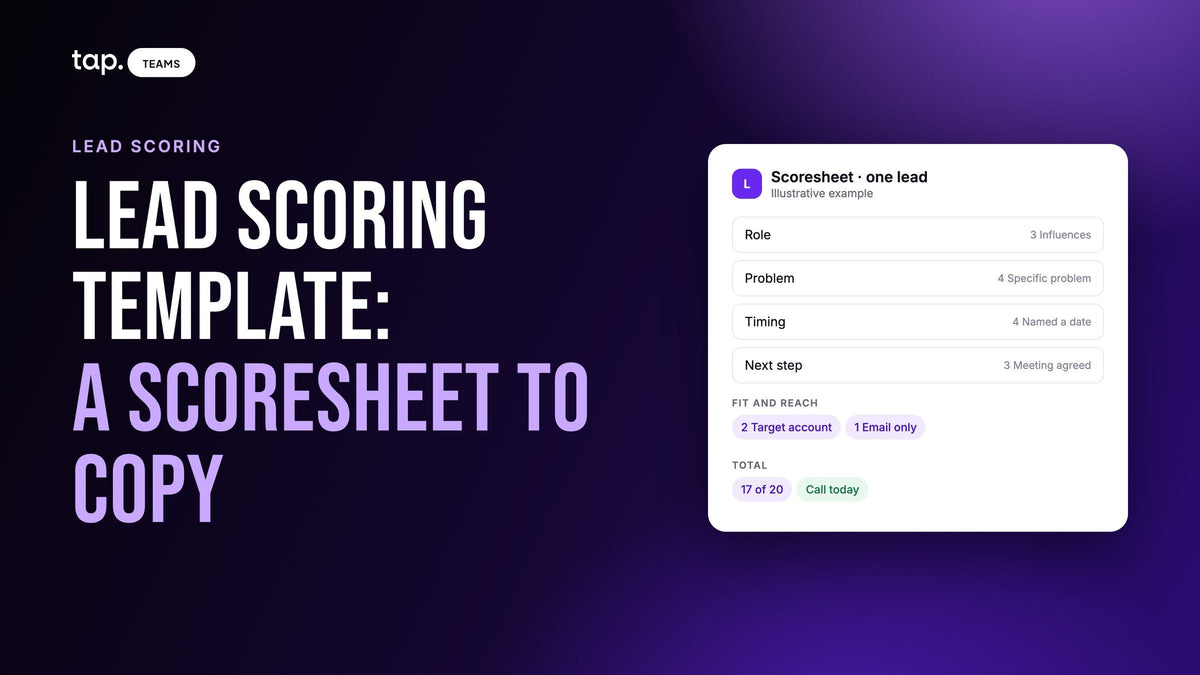
Here's a lead scoring template you can copy: six questions a rep answers on a phone right after a conversation, each with fixed answers worth points, 20 in total. A score of 14 or more means call today, 8 to 13 means this week, and under 8 means nurture. The numbers are a starting point to adjust.
Many lead scoring templates sit behind an email form, and most of the ones I read score web activity: page visits, email clicks, downloads. None of that exists for someone your rep met at a stand twenty minutes ago. This one scores what the person told you, because that's what you have, and it's built so a rep can fill it in standing up. If you'd rather score what was captured, like phone, job title and email domain, our 100-point lead scoring model example does that with a longer spreadsheet. For how scoring works in general, start with the guide to scoring leads you meet in person.
The scoresheet
Every number here is my own starting guess for a B2B field team. Nobody measured them, and you should change them to suit what you sell. Pick one answer per question.
| Question | Answer (the first number is the points) |
|---|---|
| Role in the purchase | 5 Decides |
| Role in the purchase | 3 Influences |
| Role in the purchase | 1 End user |
| Role in the purchase | 1 Gatekeeper |
| Role in the purchase | 0 Not relevant |
| Problem | 4 Specific problem |
| Problem | 2 General interest |
| Problem | 0 Just browsing |
| Timing | 4 Named a date |
| Timing | 2 Rough timeframe |
| Timing | 0 No timing |
| Next step | 3 Meeting agreed |
| Next step | 1 Asked for info |
| Next step | 0 Nothing agreed |
| Fit | 2 Target account |
| Fit | 1 Not sure |
| Fit | 0 Outside target |
| Reach | 2 Direct phone |
| Reach | 1 Email only |
| Reach | 0 Neither |
| Promised something by a date? (no points) | Yes |
| Promised something by a date? (no points) | No |
The points sit at the start of each answer on purpose. It means the spreadsheet can read the score straight out of the answer, with no lookup tab to break, and anyone looking at a row can add it up in their head.
I weighted role, problem and timing most because those are the things only the rep knows, and they fade fastest. Reach gets 2 points at most: it matters, but a missing number can often be found later, and a forgotten deadline can't. If the role labels are new to your team, our piece on buying roles in B2B sales explains each one.
How a rep fills it in
Do it in the gap between the conversation and the next person, before the details blur together. Six taps and one line of notes. If there's a queue, save the name and come back that evening, because by next week it's guesswork.
Two reps will hear the same conversation differently unless you agree what the answers mean. These are the definitions I'd give them:
- Specific problem: they described it in their own words, like "we lose a day on every customs delay." Asking what your company does is general interest.
- Named a date: a contract ending in March or a budget round next quarter. "Sometime next year" is a rough timeframe.
- Meeting agreed: you both said yes to a next conversation. "Send me something" is asked for info.
- Target account: the company matches the list you came to the show for. If you can't tell, pick Not sure and let someone check later.
A blank counts as zero, so a skipped question costs points until someone answers it. I like that, since it makes the gaps visible.

Turn the total into an action
I've named the tiers after what the rep does, so nobody has to remember what a label means.
- 14 to 20, Call today. They've told you enough that waiting costs you something.
- 8 to 13, This week. A personal follow-up, by phone or email, within a few working days.
- 0 to 7, Nurture. One email, then leave them alone unless they reply.
If your team already says hot, warm and cold, use those names instead. Our guide to hot, warm and cold leads covers what each one means for leads met in person.
Two answers skip the arithmetic. Not relevant sends the lead to Nurture whatever the total, so a consultant who booked time to pitch you can't climb the list. A promise sends the lead to Call today whatever the total, including Not relevant, because someone is now waiting on you. The article on which trade show leads to call first explains why promises come before the score, and sets out the follow-up order after that.
Three leads scored
All three are invented. An operations director at a distributor spent ten minutes on late deliveries, said the current contract ends in March, booked a meeting and gave a mobile number. That's 5, 4, 4, 3, 2 and 2, so 20 out of 20. Call today.
A procurement manager influences the decision and liked the demo. She gave no timing, asked for a brochure and left an email address. That's 3, 2, 0, 1, 2 and 1, so 9. This week. If the rep had said "I'll send the spec by Thursday," the promise would move her to Call today.
A consultant wants to partner with you. He's friendly, he talks about the industry and he agrees to a meeting. That's 0, 2, 0, 3, 2 and 2, also 9, but Not relevant overrides the total. Nurture. Same score as the procurement manager, and a very different week.
Notice what the sheet doesn't look at: the email domain. An owner who gives a gmail address loses nothing here, which is one way this differs from a model built on captured fields.

Build it as a lead scoring template in Excel or Google Sheets
Set this up on a laptop and give reps the finished sheet. Google's help says the iPhone and iPad app can't create dropdowns, though reps can pick from one that exists.
- Create a tab called Lists. Give each question its own column: Role in column A, Problem in B, Timing in C, Next step in D, Fit in E, Reach in F, Promised in G. Put the question in row 1 and type its answers underneath, exactly as they appear in the table above.
- Create a tab called Scoresheet with the twelve headers below in row 1.
- Add the dropdowns. Select B2 down to about row 500 and point it at Lists!A2:A6. Then do the same for C, D, E, F and G using the answers in columns B to F of Lists (rows 2 to 4), and for H using Lists!G2:G3. In Google Sheets, use Insert, then Dropdown, and choose "Dropdown from a range." In Excel, use Data, then Data Validation, and set Allow to List.
- Paste the two formulas below into K2 and L2, and fill them down.
- Freeze row 1 and column A, so the header and the lead's name stay on screen as a rep scrolls sideways.
| Column | Header | What goes in it |
|---|---|---|
| A | Lead | Name, typed |
| B to G | Role, Problem, Timing, Next step, Fit, Reach | Dropdown answers |
| H | Promised | Yes or No |
| I | Note | One line, like "wants a quote for the Jeddah site" |
| J | Met by | The rep's name |
| K | Score | Formula |
| L | Action | Formula |
Score, in K2. It takes the first character of each answer and adds them up, and a blank counts as 0:
=VALUE("0"&LEFT(B2,1))+VALUE("0"&LEFT(C2,1))+VALUE("0"&LEFT(D2,1))+VALUE("0"&LEFT(E2,1))+VALUE("0"&LEFT(F2,1))+VALUE("0"&LEFT(G2,1))
Action, in L2. It checks the promise first, then Not relevant, then the two thresholds:
=IF(A2="","",IF(H2="Yes","Call today",IF(B2="0 Not relevant","Nurture",IF(K2>=14,"Call today",IF(K2>=8,"This week","Nurture")))))
To test it, enter the procurement manager from above. K2 should show 9 and L2 should show This week. Change H2 to Yes and L2 should switch to Call today. If your version of Excel separates formula arguments with semicolons, swap the commas in both formulas. When you change a threshold, edit the 14 or the 8 and fill the column down again.
If this sheet is your only record of the lead, add phone and email columns at the far right. It then holds people's contact details, so share it with named teammates and keep link sharing off.
Making it work on a phone
A twelve-column sheet is awkward at phone width, so the column order matters. Everything a rep touches sits together from A to I, and the formulas sit out of the way at the end. Keep the columns narrow, since the answers are only a couple of words. Sort by Score on a laptop later.
Halls often have poor signal, so plan for it. Google Sheets lets you save a file for offline use from its menu; do that before the show and try it in airplane mode. Microsoft's guide to dropdowns doesn't cover its phone apps, so if you're on Excel, try picking an answer on a real phone before you travel.
If the phone fails you altogether, write six digits on the back of the business card: 3-2-0-1-2-1. Those are the points in order, the total is there to add up, and someone can type it in that evening.
Some teams prefer a form with one multiple-choice question per screen, feeding a response sheet. It's nicer to fill in on a phone, but it needs a connection, and you'll need to check your formulas still run on each new response row.
What to change before you use it
Start with the questions. If you only sell to one industry and every visitor fits, Fit tells you nothing, so replace it with something that does, like whether they already use a competing product. Keep the fixed answers. "Seemed keen" can't go on a scoresheet because no two reps mean the same thing by it.
Then the thresholds. Call today has to be a list your team can actually call today. Our model example shows how to work out those lines from call capacity, and the same method applies at this scale. If nearly every lead from a show lands in Call today, raise the 14.
Before the show, have two or three reps score the same made-up conversation separately and compare. Where they disagree, tighten the definition. Afterward, check which tier your new opportunities came from, then change one number at a time and tell the team when you do.
Where a template like this stops working
A shared sheet is fine for a small team at an occasional show. It starts to strain when someone is copying rows into a CRM every evening, when reps forget which version of the sheet they have, or when nobody can see which leads were never followed up. It also depends on reps filling it in, and the busier the stand, the more blanks you'll get. That's usually when a lead capture tool starts to pay for itself, because the record exists the moment the lead is saved.
How Tap handles this
The sheet above isn't Tap's model, so don't read its numbers as Tap's. It has a different scale and different questions. Tap gives every captured lead a quality score out of 100, worked out from the data captured rather than how the conversation felt: field completion contributes up to 55 points, email domain up to 20 and seniority up to 25. Hot is 75 to 100, Warm is 40 to 74 and Cold is 0 to 39. The lead quality score docs list every weight.
Right after a lead is saved, the app offers two quick questions, relationship and buying role, and both can be skipped and filled in later. Relationship is for sorting only. Buying role takes over the 25-point seniority slot, and Not relevant caps the lead at 25. Reps see a Hot, Warm or Cold badge in the mobile app, and managers see the same score as a percentage with a colored bar in Tap Teams. Captured leads queue offline and sync when the phone reconnects.
Tap's score can't see the conversation beyond the buying role, and the docs say to read it alongside the meeting summary. If you want this scoresheet as well, you can export your leads to a spreadsheet, filtered to one slice, and add the columns there.
See the lead capture page for the overview, or book a 30-minute demo to see how it would score your team's leads.
FAQ
Is there a lead scoring template I can copy?
Yes, the scoresheet above. There's nothing to download and no form: copy the answers into a Lists tab, add the twelve columns and paste in the two formulas. The points and thresholds are starting numbers, so adjust them for your team.
How do I make a lead scoring template in Excel?
Put your answers on a second tab with the points at the start of each one, use Data Validation to turn the answer columns into dropdowns, add a formula that sums the first character of each answer, and use nested IF statements to turn the total into an action.
What should a lead scoring template include?
The criteria, fixed answers with points, a total, thresholds and the action each threshold triggers. For leads met in person, I'd use role, problem, timing, next step, fit and how you can reach them, because there's no click history to score.
What score counts as a hot lead?
It depends on the template. On this 20-point sheet I'd start the top tier at 14 and move the line to match how many calls your team can make in a day. Tap's own 100-point model is separate, and its Hot tier starts at 75.
Can I score leads without a CRM?
Yes. A shared spreadsheet is enough for a small team, as long as each lead has a named owner and someone checks the Call today list every evening of the show. You'll want more once rows are being copied by hand into another system.

Leave a comment
This site is protected by hCaptcha and the hCaptcha Privacy Policy and Terms of Service apply.