
A digital business card with automatic lead scoring scores every lead it captures the moment it's saved. The score comes from what the exchange collected: which details the person gave, whether the email is a company address, and how senior they are. It then sorts leads into hot, warm and cold, so the team knows who to call first.
The catch is that a card exchange gives a score far less to work with than a website visit does, and the part it can't see usually decides the deal. Below: which signals a card can actually feed a score, how a score becomes a call list, and how to test a card tool before you buy.
What automatic lead scoring on a digital business card means
Lead scoring gives each lead points for things that predict a sale, adds them up, and uses the total to decide what happens next. Our lead scoring guide covers the method in full. "Automatic" only means nobody types the number in. The rep shares the card, the visitor submits the form, and the score is there when the lead appears.
There are two ways software does this. Rule-based scoring adds fixed points for fixed facts: a phone number is worth this much, a director's title is worth that much. Predictive scoring trains a model on your past wins and losses and estimates the odds for each new lead. Predictive needs a long history of clean, closed deals, which most event teams don't have, so card tools that score leads mostly use rules. That's fine. When a rep asks why a lead shows as Warm, someone can answer.
The question worth asking is what the rules can see. On a website, scoring feeds on behavior: pages visited, emails opened, a pricing page viewed twice. A card exchange takes a minute or two in a hall or an office, and the behavior that matters, the conversation, isn't recorded unless somebody records it.
What a card exchange can actually tell a score
When someone taps a card or scans its QR code and fills in the form, the lead record holds what they typed, and the rep can add a little more before they walk away. That's the raw material. Here's what each piece is worth as a signal.
| Signal | Where it comes from | What it tells you |
|---|---|---|
| Phone number | The form, or the rep | You can reach them quickly. People who don't want a call leave it blank. |
| Job title | The form, a scanned card | Roughly how senior they are, if nobody has said otherwise. |
| Email and company | The form | A way to follow up, and an account to attach them to. |
| Email domain | Read from the email | A company address ties them to an employer. A gmail address tells you very little about fit. |
| Answers to your own questions | A custom form field | Whatever you asked: product interest, timeline, region. |
| Buying role | The rep, right after the exchange | Whether this person decides, influences, uses the product or just guards the door. |
| Seniority from enrichment | A lookup after capture | Their current level, when the form didn't say. |
Notice what's missing. Card analytics, the views and link clicks a profile collects, mostly describe your profile's audience. Someone who opened your card twice and never submitted the form is a view count, and you can't call a view count. Some tools fold those clicks into a score anyway. Ask whether they attach to a named lead before you give them any weight.
The fields on your form also set the ceiling for every score: a form that asks only for name and email produces thin scores, however clever the rules. Our guide to the digital business card with lead capture built in covers how to keep that form short enough that people finish it.

How a score turns into hot, warm and cold
A number on its own doesn't change who picks up the phone. The tiers do, as long as each comes with an action agreed in advance.
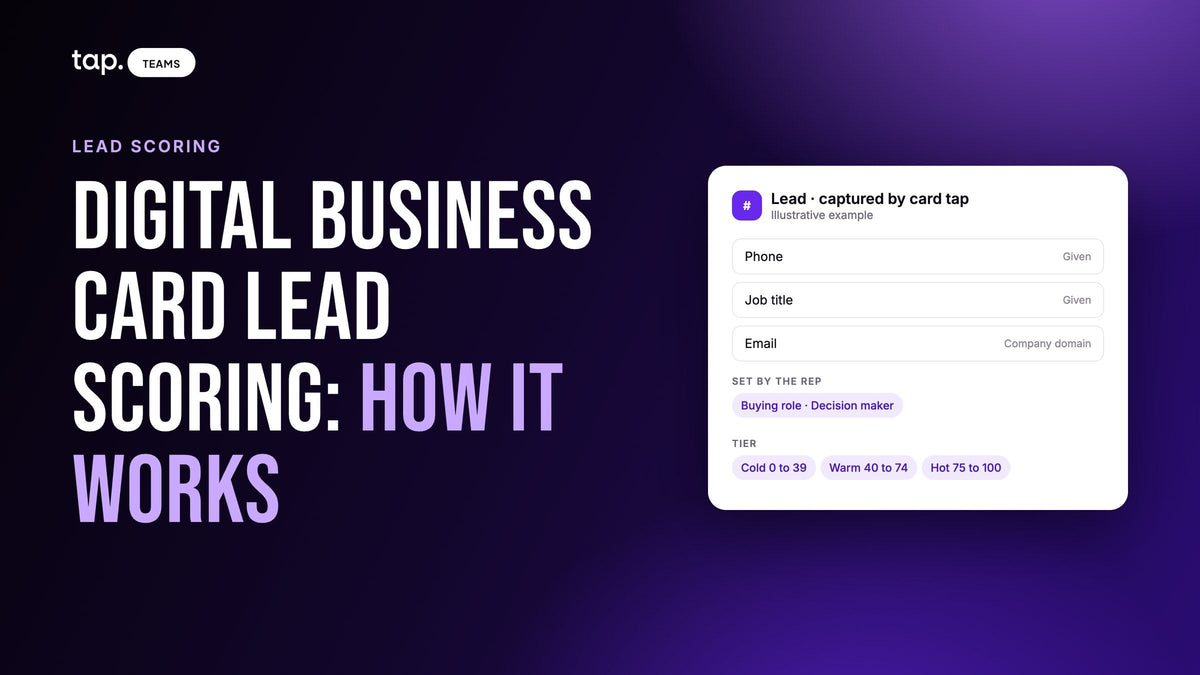
Tap publishes its scoring rules, so they make a useful worked example. In that model the score runs from 0 to 100. Phone number, job title, email and company together are worth 55 points, a company email domain adds 20, and seniority fills one slot worth up to 25. The tiers are Hot from 75 to 100 (a same-day call), Warm from 40 to 74 (a follow-up sequence) and Cold from 0 to 39 (nurture, or leave alone). Lead scoring model example walks through it line by line.
Now picture two visitors at the same stand. This is a hypothetical, but it's the kind of pair every event produces. Both fill in phone, job title, email and company, so both start with the full 55. Both use a gmail address, so neither gets the 20 for a company domain. One lists her title as Specialist, which is worth 5 in that model when nothing better is known. She lands on 60: Warm, a sequence email next week.
What the form doesn't know is that she told the rep she signs off the budget for this purchase and wants a quote this month. If the rep marks her as the decision maker, the seniority slot takes the buying role's 25 instead of the title's 5, and she moves to 80. Hot. Same person, same form, one tap from the rep. The business vs personal email article covers the other half of her problem, the gmail address.
The same lever works in reverse. A student collecting free pens can fill in a perfect form with a university address. A rep who marks him "not relevant" caps him at 25, and the follow-up list stays clean.
Who calls first then follows from the tiers, with two exceptions worth writing into the routine. Anyone the rep promised something to goes first, whatever their score, because a broken promise costs more than a late call. And existing customers go to their account owner rather than into the new-lead queue. Everything else runs top-down: the rep who met a Hot lead calls the same day, Warm leads get a personal email within the week, Cold leads go to nurture. Our article on hot, warm and cold leads goes deeper on what each tier should trigger.
What scoring can't know without the conversation
An automatic score is mechanical on purpose. That's its strength the morning after a show, with a few hundred leads to sort, and its limit everywhere else. These are the things the form never hears:
- whether they have budget, and whose
- when they want to buy, if they said
- what they asked for: a quote, a sample, a visit to their site
- which competitor they use now
- whether they're already a customer of yours under a different contact
Some of this a rep can feed back into the score in seconds, and the buying role is the obvious one. The rest belongs next to the score: a one-line note typed before the next visitor arrives, or a recording of the conversation, made with the other person's consent, that produces a summary. A rep reading a Warm lead with a note that says "wants pricing for two sites by Friday" knows exactly what to do with it. The score alone would have parked it in a sequence.
The score decides the order of the list. The conversation decides what you say when you call.

Scoring at events and in the field
At a trade show, scoring is triage. A team comes back with a few hundred leads and a few days before they cool, and the score turns that pile into an order. Two habits make it work. Qualify at the stand, while the conversation is fresh, since a buying role guessed a fortnight later is a guess. And read the tiers on the phone each evening, so the Hot leads from day one get a call before day two starts.
On field visits the score does a different job. A rep visiting accounts doesn't need triage; they know who they saw. What the score shows a manager is how complete those records are. A territory where every lead scores Cold isn't necessarily full of bad prospects. More often, nobody is capturing phone numbers or job titles, and that's a coaching conversation about the form, not the market.
Scanned cards and badges need the same care. A card scanned at a busy stand often comes through without a mobile number, and a badge may carry little more than a name and a company. Those leads score lower because they hold less. When a visitor offers a paper card, take it, then share your own and let them fill in the form as well.
How to evaluate a digital business card tool on lead scoring
"Automatic lead scoring" on a feature list can mean anything from a real model to a star you tap by hand. These checks separate them.
| Check | What good looks like |
|---|---|
| The rules are written down | You can read every input and its weight, and work out any lead's score yourself. |
| Every lead is scored | Form leads, scanned cards, badges and leads typed in by hand all get scored by the same rules. |
| The rep can add what was said | A quick qualifier after capture, such as buying role, that changes the score. |
| Free email is handled honestly | The tool tells you how a gmail address is scored, so a good lead on gmail doesn't vanish into Warm unnoticed. |
| The rep can read it at a glance | A tier on the phone, without opening the lead. |
| The manager can sort by it | The team's leads sorted by score, with who met them and when. |
| It drives something | The score can trigger the next step, like enriching only leads above a set score. |
| Engagement signals are explained | If views or clicks count, you can see which named lead they belong to. |
Then run three test leads in the trial. Fill in one complete form with a company email. Fill in a second with a gmail address and no job title. Scan a paper card for the third. If you can't predict all three scores before you see them, you'll struggle to explain them to your reps. You can see one implementation of this list on Tap's lead capture page.
How Tap handles this
Every lead captured in Tap gets a quality score out of 100, worked out from the data captured rather than how the conversation felt. Field completion contributes up to 55 points, the email domain up to 20 and seniority up to 25, and the lead scoring docs list every weight. The seniority slot takes the buying role when a rep has set one, then seniority found by enrichment, then the job title. Scanned leads are scored on the same rules, and missing fields cost points.
The score shows two ways. Tap Teams shows a percentage with a colored bar, so a manager can sort a long list and work top-down; the mobile app shows a Hot, Warm or Cold badge, so a rep can triage at a busy booth without reading numbers. It's the same score. Hot is 75 to 100, Warm 40 to 74, Cold 0 to 39.
Right after a lead is saved, the app offers two quick questions: the relationship and the buying role. Both can be skipped and answered later. Relationship is for sorting only. Buying role takes over the 25-point seniority slot, and "Not relevant" caps the lead at 25. Team Insights shows how the team answered, including how many decision makers it met. When a rep records the conversation, Tap's meeting analysis picks out the summary, buying signals and objections, and the docs say plainly to read the score alongside the summary, never instead of it.
The score also drives enrichment. Your full-team admin can have new leads looked up automatically and set a minimum score, so lookups go on the leads worth calling. See the lead capture page for the overview, or book a free 30-minute demo to score a few of your own leads live.
FAQ
What is a digital business card with automatic lead scoring?
A digital card that captures the other person's details through a form and scores the resulting lead as soon as it's saved. The score is based on what was captured, such as phone, job title, email domain and seniority, and it places the lead in a hot, warm or cold tier so the team knows who to call first.
How does automatic lead scoring work on a business card exchange?
Most card tools use rules: fixed points for each detail captured, added up. The form supplies contact details and title, the email domain shows whether it's a company address, and a buying role set by the rep says how much say they have in the purchase. The total sets the tier.
Can a lead score tell you if someone is ready to buy?
Not on its own. A score built from a card exchange knows what the person typed, not what they said. Budget, timing and requests for a quote never reach the score directly. The rep's buying role carries some of it into the score, and the rest lives in a note or a meeting summary, so read the score together with those.
What should a sales team look for in a digital business card tool for tracking leads and follow-up?
Published scoring rules, a score on every lead including scanned ones, a quick qualifier the rep can set after the conversation, a tier visible on the phone, a manager view sorted by score with who met each lead and when, and CRM sync. Test it with a few leads before rolling it out to the team.

Leave a comment
This site is protected by hCaptcha and the hCaptcha Privacy Policy and Terms of Service apply.