
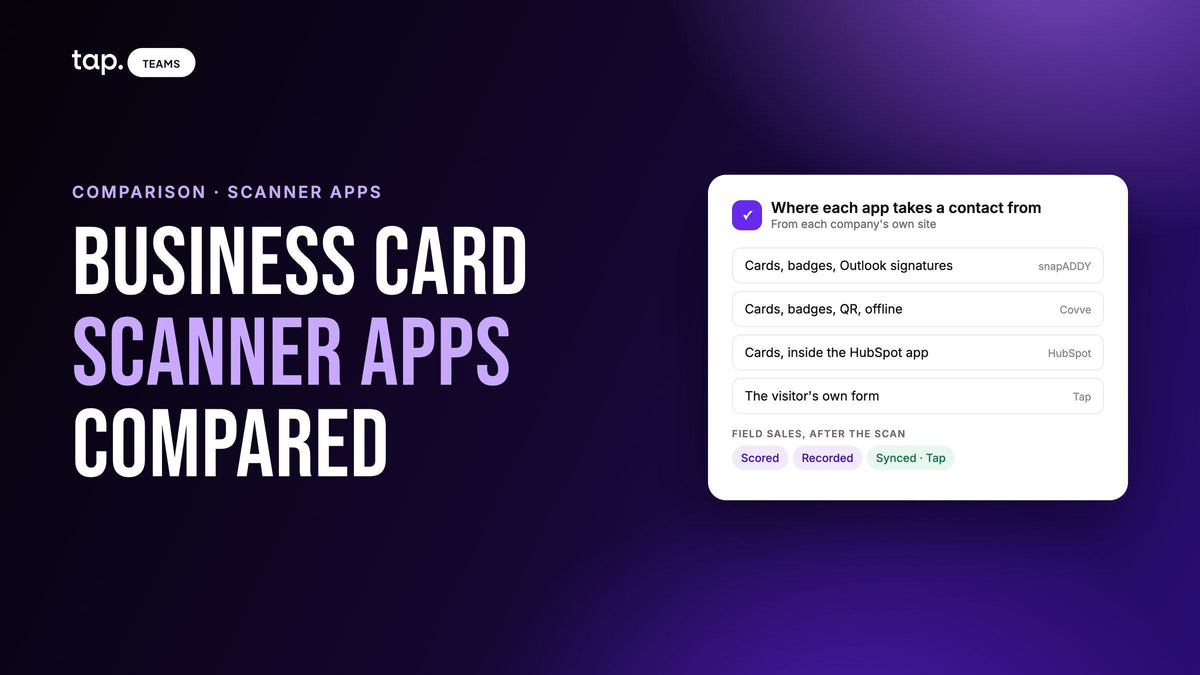
For a sales team, the business card scanner apps worth comparing are snapADDY, Covve, HubSpot's built-in scanner and Tap. snapADDY suits CRM-heavy teams that also want email signatures and trade show questionnaires. Covve is the focused scanner with offline capture and duplicate-free sync. HubSpot's app suits HubSpot-only teams. Tap suits field teams that need each lead scored, recorded and synced.
Most pages ranking for this search list fifteen apps in a few lines each. This one takes four and covers what a sales manager has to decide: where contacts come from, what happens when the same person turns up twice, which CRMs are native, and what the manager can see. Every claim about snapADDY, Covve and HubSpot comes from that company's own website, checked on 23 October 2026. If you want the mechanics of scanning itself (what arrives in the CRM, where OCR goes wrong, lead or contact), our guide to business card scanners and your CRM covers that, and this page doesn't repeat it.
What to compare in a business card scanner for a sales team
Almost any modern scanner reads a clean card well enough. The differences show up when twenty reps scan at the same show and everything has to land in one CRM. Five questions separate the apps below.
- Where do your contacts come from? Paper cards, event badges, QR codes, email signatures, or the conversation itself. Each app covers a different mix.
- Does it check the CRM before it creates a record? A scanner that only dedupes inside its own app still lets a second copy of last year's contact into Salesforce.
- Is your CRM native? A direct integration usually handles field mapping and record owners; a Zapier route or a spreadsheet export puts a person back in the loop.
- What does the manager see? A shared list of who captured what, roles and permissions, or nothing beyond the CRM.
- What happens to the context? A scan gives you contact fields. Questionnaires, voice notes and recorded meetings are how the reason you talked survives the drive home.

The apps, one by one
Each gets the same treatment: what it is, how it handles scanning, CRM sync, duplicates and team features as its own pages describe them, where it fits best, and what to check.
1. snapADDY
snapADDY is a German company that sells software for capturing contact and lead data. The name covers several products, and the right one depends on the job. BusinessCards is the scanner app. VisitReport is the lead app for trade shows and field sales. LeadResearch captures contacts from email signatures and other online sources. DataAgents automates CRM workflows.
BusinessCards scans paper and digital business cards, handles batches, and lets you add notes and attachments to a contact. snapADDY says it reads cards in many languages. The app doubles as a digital business card, shared by QR code, link or wallet. For teams, snapADDY offers a team version that manages cards centrally and transfers scans straight into the CRM, with export "without duplicates." Data is processed in Germany under GDPR, and snapADDY's IT security management is ISO 27001 certified.
VisitReport is where snapADDY goes beyond scanning. Reps capture contacts from a business card, a badge, NFC, business social profiles or existing CRM data, and VisitReport checks each one for duplicates against the CRM and fills missing fields from public sources. Custom questionnaires qualify the lead on the spot. Voice AI lets a field rep dictate the visit report after a meeting: it maps what was said to the questionnaire, asks for anything missing and writes a summary. snapADDY says Voice AI works across European languages and doesn't save the recordings themselves. There's also an offline mode, a kiosk mode that turns a tablet into a self-service station at the booth, and a dashboard with real-time reporting and roles and permissions. Badge scanning works by connecting to the organizer's badge provider through its API; snapADDY publishes the list of shows it has already connected, split into Europe and the Americas.
On CRMs, snapADDY's integrations page features SAP Sales Cloud, Salesforce, Microsoft Dynamics, HubSpot and Pipedrive, with an API for other systems. Its trade show page also names Marketo, Pardot and Evalanche for marketing automation.
Email signatures are snapADDY's clearest advantage on this list. LeadResearch runs as an Outlook add-in, reads the signature at the bottom of incoming emails, matches it against your existing CRM contacts to avoid duplicates, and offers only plausible signatures as contact suggestions. You can exclude sender domains, and each user decides whether to connect their inbox.
Better fit when your CRM is SAP Sales Cloud or Dynamics, your marketing team runs a busy trade show calendar in Europe, and you want the inbox treated as a lead source too. It's also the clear pick if visit reports from field sales are a requirement and you want them dictated rather than typed.
What to check: which product you need. A scanner for a few reps is BusinessCards; questionnaires, badge scanning and Voice AI are VisitReport; signatures are LeadResearch. Check that your shows' badge providers are on the connected list, or that snapADDY can add them.
2. Covve
Covve's site is built around one thing: the scanner. It scans paper cards, any event badge, QR codes and digital profiles, and calls itself "the most accurate business card scanner on the market." Covve says it reads many languages and copes with multi-part names and unusual layouts, mapping each detail into the right field, including your custom fields. Cards, QR codes and badges scan with no internet connection, and the contacts sync to the team workspace and the CRM once the phone is back online.
Native integrations listed on Covve's site are Salesforce, HubSpot, Zoho CRM, Pipedrive and Microsoft Dynamics 365, plus Zapier, Outlook Contacts, Google Contacts and Excel export. On duplicates, its integrations page says Covve "intelligently deduplicates records during every sync," so updates go into the CRM without creating duplicate contacts.
Around the scanner sit a few lead tools. Voice capture creates a contact from a spoken description and adds voice notes. AI Lead Qualification builds a short bio, a company snapshot, talking points and a LinkedIn link from public information such as the person's LinkedIn profile and company website. Custom fields (dropdowns, toggles, text and multiselect) are defined centrally by an admin and mapped to the CRM. The Covve Portal shows every lead the team has captured in one place, tracks capture while the team is still on the trade show floor, and handles users and seats. Admins can see who scanned each lead and when, and set whether leads are shared with the whole team or with admins only. Covve says its Enterprise tier adds SSO and audit logs, and that it is ISO 27001 certified and GDPR compliant. It also sells a digital business card, a personal CRM and a scanning API.
Compared to snapADDY, Covve is the narrower, more scanner-shaped product; the head-to-head below goes through the differences. Covve's pages describe no email-signature capture and no calculated lead score.
Better fit when the job is "scan everything at the show, accurately, offline, and get it into Salesforce, HubSpot, Zoho, Pipedrive or Dynamics without duplicates," and you'd rather not set up questionnaires and workflows first.
What to check: whether "qualification" for you means context or a score. Covve's AI research gives a rep context before the follow-up; it doesn't rank a list of two hundred leads for the manager.
3. HubSpot's business card scanner
If your team already lives in HubSpot, you may not need a separate app. The scanner is part of the HubSpot mobile app on iOS and Android: open it, tap "create contact," point the camera at the card, and HubSpot parses the card and maps each detail to the right HubSpot property. The contact is then associated with its company automatically, and the rep can send a tracked follow-up email, call or set a task from the same record. HubSpot says the scanner uses machine learning to get better at matching data to properties over time.
Better fit for a HubSpot-only team that mostly collects cards one at a time and wants nothing else to install.
What to check: HubSpot's scanner page doesn't describe badge scanning, offline capture, duplicate handling or any team admin features, and it only writes to HubSpot. Test it on a stack of real cards before a busy show.
4. Tap
Tap is our product, so read this one with that in mind. Its docs describe it as a lead capture platform for teams who meet people in person, and they're blunt about scanning: "Scanning is the fallback, not the default." The usual capture is the other way round. The rep shares a profile by NFC tap, QR code or link, and the visitor fills in your lead capture form on their own phone, so there's nothing to misread and you get your custom fields, not just what fits on a card. When someone hands over a card anyway, the scanner reads business cards, QR codes and event badges, or a photo from the gallery, and shows what it read before saving. A scanned lead then behaves like any other: it gets scored, syncs to the CRM and can carry meetings and follow-ups. Captures queue offline and sync when the phone reconnects.
Native CRMs in the docs are Salesforce, HubSpot, Zoho, Pipedrive, Veeva Vault and Odoo, plus Zapier for anything else, and Slack can post lead alerts to a channel. The docs list which record each CRM gets: a Lead in Salesforce and Zoho, a Contact in HubSpot and Veeva, a Person plus a Lead in Pipedrive, your choice in Odoo. Duplicates are matched by email in the CRM, and in Odoo by phone too when there's no email. Existing records are merged so a blank never erases data, and the owner is the CRM user whose email matches the rep.
Where Tap goes further than the others is what happens after the capture. Every lead gets a quality score out of 100 from rules published in the docs, enrichment fills only empty fields, and the rep can record the meeting that follows, with the other person's knowledge. The analysis returns a summary, buying signals, objections and action items, which sync to the lead's CRM record as a task. The app runs in English and Arabic.
Better fit when your reps sell face to face all year, in offices, clinics and on site visits as well as at shows, and the manager needs each lead ranked and the conversation on record as well as the contact details.
What to check: Tap's docs don't describe email-signature capture, batch scanning or SSO, and SAP and Dynamics aren't on the native list, so check whether a Zapier route covers them. If capturing signatures from Outlook is part of the brief, snapADDY covers it and Tap doesn't.
snapADDY vs Covve, head to head
Scanning. Both scan paper cards and event badges and work offline. Covve's pitch is accuracy, languages and speed in one app. snapADDY splits scanning across BusinessCards (cards) and VisitReport (cards, badges, NFC, social profiles), and badge scanning in VisitReport connects to the organizer's badge provider.
Email signatures. snapADDY captures them through the LeadResearch Outlook add-in. Covve's pages don't describe signature capture. If this is on your list, it decides the question.
Enrichment and qualification. snapADDY's VisitReport fills missing fields from public sources, qualifies with your own questionnaires and scores leads. Covve's AI Lead Qualification gives the rep a bio, a company snapshot and talking points; qualification otherwise runs through custom fields.
Duplicates. Both check against the CRM: snapADDY in the scanner export, in VisitReport and in LeadResearch; Covve on every sync. Neither page explains how a match is decided, so test it with a contact you know is already in your CRM under a slightly different spelling.
In short: Covve if you want the scanner and little else; snapADDY if scanning is one part of a wider process with questionnaires, visit reports, signatures and an enterprise CRM.
Business card scanner apps at a glance
| App | Fits best | Captures from | Native CRMs listed | Duplicates | Team features listed |
|---|---|---|---|---|---|
| snapADDY | CRM-heavy sales and marketing teams; trade shows in Europe; dictated field visit reports | Paper and digital cards; badges via organizer APIs; NFC; social profiles; email signatures (Outlook add-in); voice reports; tablet kiosk | SAP Sales Cloud, Salesforce, Dynamics, HubSpot, Pipedrive; API; Marketo, Pardot, Evalanche | Checked against the CRM on export, in VisitReport and for signatures | Central card management, roles and permissions, real-time reporting, questionnaire configurator |
| Covve | Teams that want an accurate, offline scanner and clean CRM sync | Paper cards, any event badge, QR codes, digital profiles; voice capture | Salesforce, HubSpot, Zoho, Pipedrive, Dynamics 365; Zapier; Outlook and Google Contacts; Excel | Deduplicated on every sync | Portal with all team leads, live event tracking, access levels, seat management; SSO and audit logs on Enterprise |
| HubSpot scanner | HubSpot-only teams scanning one card at a time | Paper cards, in the HubSpot mobile app | HubSpot | Not described on its page | Not described on its page |
| Tap | Field sales teams selling in person all year | Visitor's own form by NFC, QR or link; card, QR and badge scanning with review; recorded meetings | Salesforce, HubSpot, Zoho, Pipedrive, Veeva Vault, Odoo; Zapier; Slack alerts | Matched by email in the CRM (Odoo: email, then phone); merged, not overwritten | Templates, departments with CRM access, lead score out of 100, team insights |
The table uses only what each company publishes. A thin cell may be a gap in the website, not the product, so ask in the demo.

Which one should you pick?
If you only need cards in the CRM and you're on HubSpot, start with HubSpot's own app and see whether it's enough. For a rep who collects a few cards a week, it may be all you need.
If your team scans hundreds of cards and badges at shows and the CRM is Salesforce, Zoho, Pipedrive or Dynamics, Covve and snapADDY are the two to trial. Pick Covve if you want the scanner to just work. Pick snapADDY if you also want questionnaires, visit reports, email signatures or SAP. For booth-only setups, our guide to lead retrieval apps for exhibitors covers the alternatives to renting the organizer's scanners.
If your reps sell in person every week and the problem is less "we lose cards" and more "we don't know which leads matter or what was said," a scanner alone won't fix it. That's where a form the visitor fills in, a score and a recorded meeting do more than a better OCR engine. I'd run one real week of leads through your shortlist and ask the sales manager which record they'd rather open on Monday. Whatever you choose, map your fields before the first event; our CRM field mapping guide has the checklist.
How Tap handles this
Tap starts from the other end. Instead of reading a card after the conversation, the rep shares a profile and the visitor types their details into your lead capture form on their own phone, so the email is spelled the way they spell it. When a card is all you get, the Tap scanner reads cards, QR codes and badges and shows you the result to check before it saves.
Either way, the lead gets a quality score out of 100, and a rep marking someone a decision maker moves it. Enrichment fills the fields that are still empty. If there's a meeting, the rep records it and Tap returns the summary, buying signals, objections and action items. The lead then syncs to Salesforce, HubSpot, Zoho, Pipedrive, Veeva Vault or Odoo under the rep who met them, matched by email so a second capture updates the record instead of copying it, and the meeting summary arrives as a task. The integrations overview shows which record type each CRM gets.
If that matches how your team sells, see how Tap's lead capture works, or book a 30-minute demo and bring a stack of cards from your last event. For the form side, our guide to lead capture form design is the place to start.
FAQ
snapADDY vs Covve: which is better for sales teams?
It depends on how much of the process you want in one tool. Covve is the focused choice: an offline scanner for cards, badges and QR codes, voice capture, AI context on each lead, and duplicate-free sync to Salesforce, HubSpot, Zoho, Pipedrive and Dynamics 365. snapADDY covers more ground across several products: card scanning, trade show questionnaires and badge scanning in VisitReport, dictated visit reports, and email-signature capture in Outlook, with SAP Sales Cloud among its CRMs. If you need email signatures captured, snapADDY is the one of the two that documents it.
Can sales and marketing teams use snapADDY to scan business cards at trade shows?
Yes. snapADDY's BusinessCards app scans cards at trade shows and conferences, and its VisitReport product is built for trade shows and field sales. VisitReport captures cards, badges and NFC, qualifies leads with your own questionnaires, checks the CRM for duplicates, works offline and has a kiosk mode for a tablet at the booth. Badge scanning connects to the organizer's badge provider, so check your shows against snapADDY's connected list.
What is the best CRM business card scanner?
The one built into, or natively connected to, your CRM. HubSpot users have a scanner in the HubSpot mobile app. Salesforce, Zoho, Pipedrive and Dynamics teams can use Covve or snapADDY, which both sync directly and check for duplicates. Teams on Veeva Vault or Odoo, or teams that want the lead scored and the meeting recorded, can look at Tap.
How do I scan business cards straight into my CRM?
Use a scanner with a native integration for your CRM, connect it once, map your fields, and scan one test card before the event to check every field arrives. Review each scan before saving, since a misread email is easy to miss once it's in the CRM. Our guide to what a business card scanner sends to your CRM walks through lead vs contact, duplicates and owners.
Which business card scanner also captures email signatures?
Of the apps compared here, only snapADDY documents it. Its LeadResearch product runs as an Outlook add-in, reads signatures in incoming emails, matches them with existing CRM contacts and offers new ones as contact suggestions. Covve, HubSpot's scanner and Tap don't describe signature capture on their own pages or docs.

Leave a comment
This site is protected by hCaptcha and the hCaptcha Privacy Policy and Terms of Service apply.