
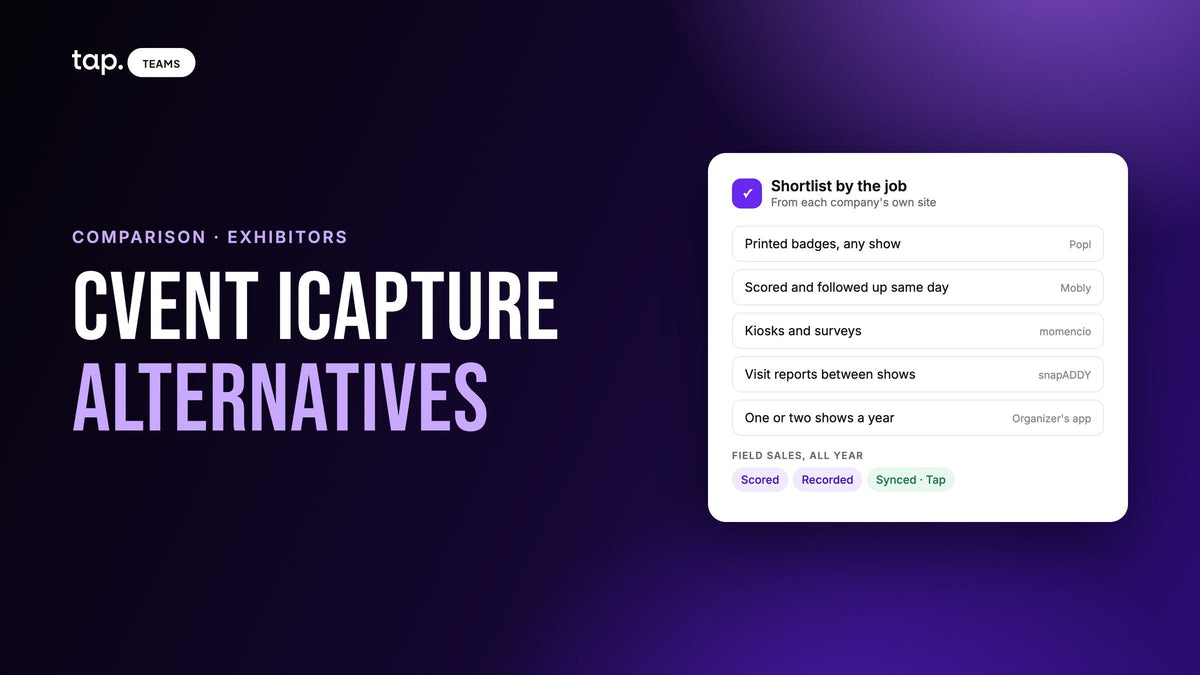
The main Cvent iCapture alternatives for exhibitors are Popl, Mobly, momencio, snapADDY VisitReport, the organizer's own lead retrieval app, and Tap. Popl reads printed badges at any show. Mobly scores and follows up from the floor. momencio adds kiosks and surveys. snapADDY covers field visits too. Tap suits teams that sell in person all year.
This page is for exhibitors who use iCapture today, or have a quote for it, and want to know what else is worth a trial. Every description of another company comes from that company's own website, checked on 24 November 2026. Prices and review scores are left out because the ones published around the web already disagree with each other. Where iCapture is the better choice, we say so. If you want the wider field first, our roundup of the best lead capture apps for trade shows compares iCapture with five other event tools and explains the two ways an app can read a badge. This page doesn't repeat that.
What Cvent iCapture is today
iCapture used to have its own website. Now icapture.com redirects to a product page on Cvent's site, which describes it as "a single app that every rep uses to scan, qualify, and route booth leads in real time." It runs on the rep's own phone, the same app at every show. Reps capture by badge scan, by photo of a card or name tag, by business card, or by typing it in for "the hallway conversation with no badge at all." When the show hands over an attendee roster, reps can work from that too.
After the scan, Cvent says iCapture enriches the record with company and contact data and a rep-confirmed email, then scores, segments and routes the lead into your CRM or marketing automation with the qualifying answers attached. Salesforce, HubSpot and Marketo are named, "and more." The page puts a lot of weight on booking the next meeting while the visitor is still at the booth, on rep and team leaderboards, and on reporting that ties each lead back to the show and booth that produced it.
One thing trips people up. Cvent sells a second product, LeadCapture, and they're easy to confuse. Cvent's own page says LeadCapture is "used at events you manage on the Cvent platform," which makes it the organizer's tool for exhibitors at Cvent-run shows. iCapture is the one you buy as an exhibitor to use at everyone else's shows.
Why teams look for an alternative
iCapture is a serious tool, and for a lot of event teams it's the right one. The reasons people look elsewhere tend to be ordinary ones:
- Their shows don't connect to the badge providers iCapture works with, so the official registration data isn't there and reps end up photographing badges anyway.
- They're a mid-market team doing a handful of shows a year, and a tool built around show-by-show reporting is more than they need.
- They want their own digital business cards and booth capture in one product.
- Their reps meet just as many buyers outside shows as at them, and want the same app on a customer visit.
- They want the conversation itself on the record, beyond a few qualifying answers.
Underneath all of these is the same problem. A rep comes off a three-day stand with a few dozen leads, the context lives in their head, and the CRM doesn't see much of it until the week after. If that's the part you're trying to fix, a 30-minute demo using one of your own show lists is a quick way to see how Tap handles it.
Which part of iCapture are you replacing?
iCapture does four jobs, and most alternatives are stronger at one or two of them than at all four. Decide which job you're really replacing before you compare feature lists.
- Capture. Getting a correct name, company and email into the app at a busy stand, whether or not the show's badge data is available.
- Qualify. Recording why this person matters, in a form that a salesperson can act on the following week.
- Route and follow up. Getting the lead to the right owner in the CRM, and getting the first message out while the visitor still remembers you.
- Report. Showing marketing which show, booth and rep produced pipeline, so next year's budget has evidence behind it.

The iCapture alternatives, one by one
1. Popl
Popl calls itself an event lead capture platform for B2B go-to-market teams. Its badge scanner reads the information printed on the badge, so Popl says it doesn't depend on decrypting the codes some events lock to their own app, and it works independently of event organizers, without badge API kits. Reps also scan business cards, LinkedIn QR codes and other digital cards. Leads are stored offline and sync once the phone is back online. Event Flows hold each show's qualifying questions, automatic tags and follow-up emails, and AI Voice Recording transcribes and analyzes booth conversations and in-person meetings. The integrations page lists Salesforce, HubSpot, Microsoft Dynamics 365, Pipedrive and Zoho, plus Marketo and Pardot, with CRM Sync Logs that show what happened to each record. Popl also sells digital business cards for teams.
Compared to iCapture, the main difference is where the badge data comes from. iCapture pulls the registration record where a badge provider is connected and works from a roster when the show supplies one. Popl starts from what's printed and enriches from there, so it doesn't wait on the organizer, but it doesn't get the fields that were never printed. Popl also covers cards and conversation recording, which iCapture's page doesn't mention.
Better fit when your show calendar changes every year and you also want team cards in the same tool. For the head-to-head, see the Popl vs iCapture answer in our Popl alternatives guide.
2. Mobly
Mobly says it's "how GTM teams standardize lead capture across any in-person event." It scans any badge type at any show, plus QR codes, barcodes, business cards and handwritten name tags, and it works offline, syncing when the connection returns. Every lead is enriched at capture and gets a 0 to 100 ICP fit score straight away. Reps add notes and tags as they scan. With its Pulse feature you trigger the first follow-up while you're still on the show floor, and the page shows it arriving as a text message. Leads land in HubSpot, Salesforce or your CRM within minutes, Mobly matches existing records before creating new ones, and owners can be assigned automatically by territory.
Compared to iCapture, Mobly puts its weight on speed after the scan: a score the moment the lead exists and a message out before the stand is packed. iCapture puts more weight on booking the meeting and on show reporting. Mobly's site names fewer CRMs than some here, so check yours.
Better fit for a small or mid-sized team that wants each lead scored and contacted the same day, without building a routing setup first.
3. momencio
momencio describes itself as "the easiest way to capture event leads and follow up fast." It collects attendee data through an event's API where there is one, and photographs badges or cards where there isn't. There's a kiosk mode with quizzes, polls and games, and attendees can capture themselves through a public QR code or link. Capture works offline and syncs on reconnect. Surveys have branch logic, reps can speak the conversation context and have it transcribed onto the lead, and leads are scored by behavior and ICP match. Follow-up can be a personalized email or a microsite based on what the visitor was interested in. The integrations page is long: Salesforce, HubSpot, Dynamics 365, Pipedrive, Zoho and several smaller CRMs, plus Marketo, Pardot, Salesforce Marketing Cloud, Mailchimp, Zapier and a webhook API.
Compared to iCapture, momencio is the closest in spirit: both are built for event marketers running a program of shows. momencio adds a kiosk and content-led follow-up, and it publishes a wider list of CRMs and marketing tools. iCapture's page is more specific about attaching qualifying answers to the CRM record and about leaderboards.
Better fit for event marketers who want visitors to engage at the stand on their own, through a kiosk or a questionnaire, and want follow-up that sends content, beyond a plain thank-you.
4. snapADDY VisitReport
snapADDY says VisitReport "is software for field sales and trade shows." Reps capture from business cards, badges, NFC, QR codes, social profiles and existing CRM data. The app works without a connection and syncs automatically once it's back online. Questionnaires have dynamic dependencies and can be configured in several languages without IT, and a Voice AI assistant turns a dictated visit report into structured fields. snapADDY checks for duplicates before export and offers custom field mapping for the major CRMs. You can license it per person, per concurrent user, or on one shared booth device.
Badge scanning works the way iCapture's does, through the show's badge provider. snapADDY connects, on request, to any provider with an API and publishes its connected list for Europe and the Americas. If your show isn't on it, you contact the provider and then snapADDY's support.
Compared to iCapture, VisitReport covers customer visits as well as shows, and its pages describe offline capture and a shared-device licence, which iCapture's page doesn't. iCapture is more focused on event marketing reporting. Our snapADDY alternatives page has more detail.
Better fit for European teams, or anyone whose reps run detailed visit reports in the field between shows.
5. The organizer's own lead retrieval app
Many shows offer exhibitors a lead retrieval app or rented scanner, and Cvent LeadCapture is one example. Cvent describes it as "one consistent lead capture tool for every exhibitor and sponsor on the floor" at events run on its platform. Booth staff scan badges or cards on a mobile device, add notes, answer qualifying questions and rate leads, and several people can work the same booth at once. Leads can be exported or sent to a CRM shortly after capture, and exhibitors see activity in an Exhibitor Portal with post-event reports.
Compared to iCapture, the organizer's app gives you that show's registration data with no setup on your side. The catch is that you get a different app, and often a different export, at every show. iCapture's pitch of the same app at every event is aimed squarely at that patchwork.
Better fit if you exhibit at one or two shows a year and both run their own lead retrieval. There's no tool for you to set up or maintain between shows.
6. Tap
Tap is our product, so read this one with that in mind. Its docs describe a lead capture platform for teams who meet people in person, at conferences, trade shows, field sales calls and events. The usual capture runs the other way round from a badge scanner: the rep shares a profile by NFC, QR code or link, and the visitor fills in your lead capture form on their own phone, with nothing to install. When someone hands over a card or wears a badge, the scanner reads business cards, QR codes and event badges and shows what it read before saving. The docs put it plainly: "Scanning is the fallback, not the default."
Compared to iCapture, Tap does less around the show and more around the person. Every lead gets a quality score out of 100, the rep sets the person's buying role right after saving, and a recorded meeting comes back with a summary, buying signals, objections and action items. The record reaches the CRM within seconds, owned by the rep who met the person, and the same app works on a customer visit the week after the show.
Better fit when your reps sell face to face all year and the manager needs to know which leads matter and what was said. See how Tap's lead capture works.
What Tap doesn't do: its docs don't describe a connection to organizer badge providers or show rosters, a kiosk mode, or automated follow-up sequences, and they say outright that Tap isn't a marketing automation tool. Marketo and Eloqua aren't native connectors. If you need registration data at connected shows and pipeline reported booth by booth, iCapture has more of that written down.
iCapture alternatives at a glance
| Tool | Fits best | How it reads a badge | Offline, per its own pages | After the scan | CRMs and MAPs named |
|---|---|---|---|---|---|
| Cvent iCapture | Event marketing teams with a program of third-party shows | Connected badge providers; the show's roster when supplied; photo of a card or name tag | Not described | Enrichment, scoring, routing with qualifying answers; meeting booked at the booth; leaderboards and show reporting | Salesforce, HubSpot, Marketo and more |
| Popl | Changing show calendars; team cards in the same tool | Reads the printed badge; no organizer dependency | Yes, syncs when back online | Event Flow questions, tags and follow-up emails; AI Voice Recording | Salesforce, HubSpot, Dynamics 365, Pipedrive, Zoho; Marketo, Pardot |
| Mobly | Small and mid-sized teams that want same-day follow-up | Any badge type, plus handwritten name tags | Yes, syncs when connectivity returns | 0 to 100 ICP fit score; Pulse follow-up from the show floor | HubSpot, Salesforce, "or your CRM" |
| momencio | Event marketers who want kiosks and content-led follow-up | Event API where there is one; photo of the badge where there isn't | Yes, syncs on reconnect | Branching surveys, transcribed voice context, scoring; emails and microsites | Salesforce, HubSpot, Dynamics 365, Pipedrive, Zoho and more; Marketo, Pardot, Mailchimp; Zapier, webhooks |
| snapADDY VisitReport | Shows plus field visit reports; European teams | Show's badge provider through its API, on request | Yes, syncs when back online | Questionnaires with dependencies; Voice AI; duplicate check | Major CRMs with custom field mapping |
| Organizer's app (e.g. Cvent LeadCapture) | One or two shows a year | That show's own badges | Not described for LeadCapture | Notes, questions, rating; Exhibitor Portal reports | Export or CRM after capture |
| Tap | Field sales teams selling in person all year | Visitor's own form first; badge or card scan with review | Yes, syncs when the phone reconnects | Score out of 100; buying role; recorded meeting with summary | Salesforce, HubSpot, Zoho, Pipedrive, Veeva Vault, Odoo; Zapier |
A thin cell may be a gap in the website rather than the product, so ask about it in the demo.
If you're a mid-market B2B team
One of the most common questions we see is whether iCapture is the right size for a mid-market team. Honestly, it depends less on headcount than on how many shows you do and who owns them.
If marketing runs a calendar of shows, reports pipeline by event and works in Salesforce, HubSpot or Marketo, iCapture is built for exactly that, and I wouldn't switch just to save a line in the budget. Rebuilding the CRM mapping and retraining every rep costs real time.
If you do a few shows a year and the same reps also sell on the road, the picture changes. You'll get more from a tool your reps open every week than from one they open four times a year, because a rep who's comfortable with the app before the show captures better at it. That points toward Popl or Mobly for a booth-first team, and toward snapADDY or Tap for a team whose reps are out visiting customers between events.

Which iCapture alternative should you pick?
- Your shows change every year and you want team cards too: Popl.
- You want every lead scored and contacted before you've packed the stand: Mobly.
- You want a kiosk, surveys and follow-up that sends content: momencio.
- Your reps write visit reports in the field as well as at shows: snapADDY VisitReport.
- You exhibit once or twice a year at shows with their own app: use the organizer's.
- Your reps sell in person all year and the manager needs to know which leads matter and what was said: Tap.
- You need registration data at connected shows and pipeline reported by show and booth: stay on iCapture.
Whichever two you shortlist, test them at a real show rather than in a demo room. Put one rep on each tool, and on the Monday after, open five records from each in the CRM. Check the spelling of the email, who owns the record, and whether the reason the person mattered made it across. That will tell you more than any feature table, this one included.
How Tap handles this
Tap starts the capture before anyone reaches for a scanner. The rep shares a profile, and the visitor types their details into your lead capture form on their own phone, so the email arrives the way they spell it. The collecting leads guide covers the three ways to share and how to keep capture reliable in a busy hall. When all you get is a card or a badge, the scanner reads it and shows you the result before it saves. Captures made offline sync when the phone reconnects.
From there every lead is handled the same way. It gets a score out of 100, which reps see as Hot, Warm or Cold. Enrichment fills only the fields that are still empty, and a lookup that finds nothing isn't charged. If there's a meeting, the rep records it and gets a summary, buying signals, objections and action items. The lead syncs to Salesforce, HubSpot, Zoho, Pipedrive, Veeva Vault or Odoo under the rep whose email matches a CRM user, and a blank field never erases what the CRM already had. The integrations overview shows which record type each CRM creates. Slack can post every lead that scores 80 or higher to a channel during the show, and afterwards a manager can filter to the show's dates and tag the whole batch in one action.
If that sounds like how your team sells, book a 30-minute demo and bring a few badges from your last show.
FAQ
What are the best alternatives to iCapture lead capture?
It depends on which part of iCapture you'd replace. For badge scanning that doesn't depend on the organizer, plus team cards, Popl. For an instant score and same-day follow-up, Mobly. For kiosks, surveys and content follow-up, momencio. For field visit reports as well as shows, snapADDY VisitReport. For one or two shows a year, the organizer's own app. For field sales teams that need each lead scored and the meeting recorded, Tap. For registration data and show-by-show reporting, iCapture itself is hard to beat.
How does iCapture compare to other event lead capture tools for mid-market B2B teams?
iCapture is built for an event marketing team running a program of third-party shows: badge-provider data, routing with qualifying answers, meeting booking and reporting by show and booth. A mid-market team doing many shows a year on Salesforce, HubSpot or Marketo will use all of that. A team doing a few shows, whose reps also sell on the road, may get more from Popl or Mobly at the booth, or from snapADDY or Tap if the same app needs to work on customer visits.
Popl vs iCapture: what's the difference?
iCapture pulls official registration data where a badge provider is connected, and focuses on routing, meeting booking and show reporting. Popl reads the printed badge so it works at any show without the organizer, and adds AI Voice Recording and digital business cards for teams. Our Popl alternatives guide covers the two in more detail.
Is iCapture the same as Cvent LeadCapture?
No. Both belong to Cvent. LeadCapture is the app an organizer offers exhibitors at events run on the Cvent platform. iCapture is the app an exhibitor buys to use at third-party shows. Since icapture.com now redirects to Cvent's site, the two are easy to mix up.
Does iCapture work offline?
Cvent's current iCapture page doesn't mention offline capture, so ask before your next show. Popl, Mobly, momencio, snapADDY and Tap all say on their own pages that captures made without a connection sync once the phone reconnects. Whichever you pick, scan a few badges in airplane mode during the trial and watch them reach the CRM.

Leave a comment
This site is protected by hCaptcha and the hCaptcha Privacy Policy and Terms of Service apply.